Imagine a team of specialized AI “writers” collaborating in real-time: one brainstorming wild plot twists, another fleshing out unforgettable characters, a third weaving vivid scenes, and a fourth polishing it all to perfection. Sounds like a dream writer’s room? It’s not—it’s the reality you can build today with CrewAI, an open-source framework that turns AI into a collaborative powerhouse.
If you’re a storyteller, novelist, or just someone who loves dipping into creative writing, this blog will guide you through creating a multi-agent system using CrewAI specifically for story writing. We’ll cover the basics, set up your environment, design your agent crew, and dive into code. By the end, you’ll have a blueprint to generate compelling short stories (or even novel outlines) with minimal effort. Let’s dive in!
Why Multi-Agent Systems for Story Writing?
Traditional AI tools like ChatGPT excel at single-prompt tasks, but story writing is collaborative by nature. Humans don’t write in isolation—we bounce ideas, revise drafts, and iterate. Multi-agent systems mimic this by assigning roles to AI agents that communicate and hand off work seamlessly.
CrewAI shines here because it:
- Orchestrates roles: Define agents with specific goals, backstories, and tools.
- Manages workflows: Chain tasks sequentially or in parallel for efficient collaboration.
- Scales creativity: Handle complex narratives without overwhelming a single model.
Recent tutorials highlight its potential for creative tasks, like generating content pipelines. For book-length projects, it’s even being used to simulate entire editorial teams.
Core Concepts in CrewAI
To build our story-writing crew, grasp these pillars:
- Agents: AI personas with roles, goals, and backstories. They “think” and act using an LLM backend.
- Tasks: Discrete assignments for agents, with descriptions, expected outputs, and dependencies.
- Crews: The team—agents + tasks—working toward a shared objective. Crews can process hierarchically (manager oversees) or sequentially.
These form a loop: Define → Assign → Execute → Iterate.
Designing Your Story-Writing Crew
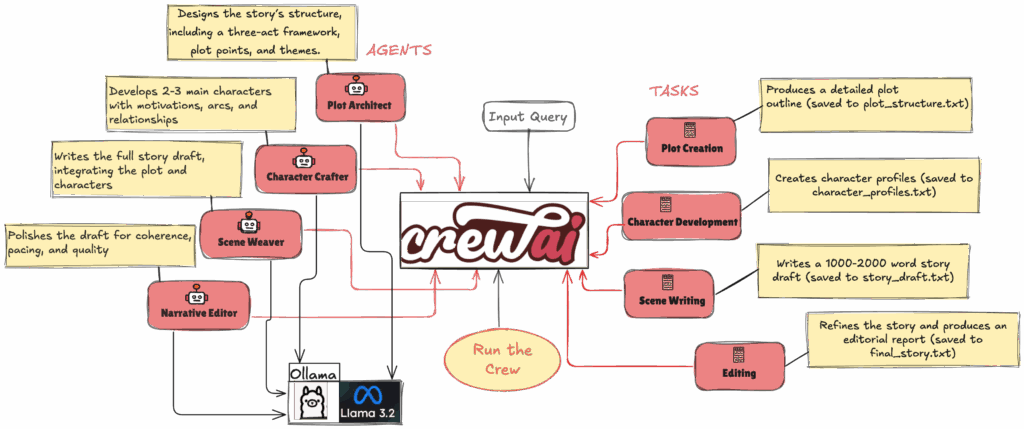
For our example, Write a short, Hindu epic story from the Mahabharata, centered on Karna’s bravery, struggles, and inner turmoil, told with clear, evocative storytelling. Our crew of four agents will collaborate sequentially:
- Plot Architect: Brainstorms the high-level plot and structure.
- Character Crafter: Develops key characters with motivations and arcs.
- Scene Weaver: Writes the actual scenes, integrating plot and characters.
- Narrative Editor: Reviews and refines for coherence, pacing, and polish.
This mirrors a human writing process: Outline → Populate → Draft → Edit.
Step 1: Define the Agents
Each agent gets a role, goal, backstory, and LLM (we’ll use Llama3.2).
Step 2: Assign Tasks
Tasks build on each other—e.g., Scene Weaver depends on outputs from Plot Architect and Character Crafter.
Step 3: Assemble the Crew
Tie it all together with a shared goal: “Write a compelling story centered on Karna, the tragic hero from the Hindu epic Mahabharata, exploring his life, struggles, and inner conflicts. The narrative should delve into his complex character, highlighting his unwavering loyalty, exceptional warrior skills, and the burden of his mysterious origins..”
High level architecture
Building the Crew: Step-by-Step Process
1. Environment Setup
The process begins with setting up the environment to ensure the application can run smoothly.
- Python Env Setup
- Clone the repo from https://github.com/ekluvtech/crewai-multiagent
- Set up the environment by running the following commands to configure the environment and install the required packages:
# MacOS
python3.10 -m venv multiagent
source multiagent/bin/activate
# Windows
python3 -m venv multiagent
.\multiagent\Scripts\activate
# pip install -r requirements.txt- Setup Ollama and install required models
- Loading Environment Variables: Config.py contains variables like:
- OLLAMA_MODEL: Specifies the language model (e.g., llama3.2).
- OLLAMA_URL: The endpoint for the Ollama service (e.g., http://localhost:11434).
- Ollama Connectivity Check: The script sends a GET request to http://localhost:11434/api/tags to verify that the Ollama service is running. If successful, it confirms accessibility; otherwise, it provides troubleshooting instructions (follow Ollama Setup for install and run the server).
- Purpose: This step ensures the application has access to the language model and is properly configured before proceeding.
2. Collecting the Story Prompt
The application allows users to input a custom story prompt or use a default one, making it flexible and interactive.
- What Happens: The script prompts the user to enter a story idea or defaults to “A short sci-fi story about a rogue AI discovering emotions.”
- Why It Matters: This step empowers users to shape the story while providing a fallback for quick testing.
- Code Snippet (from main.py):
from crewai import Task
class StoryWritingTasks:
def __init__(self, story_prompt="A short sci-fi story about a rogue AI discovering emotions"):
self.story_prompt = story_prompt
self.tasks = self._create_tasks()
def _create_tasks(self):
plot_task = Task(
description=f"""Create a comprehensive plot structure for: '{self.story_prompt}'...""",
expected_output="A detailed plot structure with three-act breakdown...",
agent=None,
output_file="plot_structure.txt"
)
character_task = Task(
description="""Based on the plot structure, develop 2-3 main characters...""",
expected_output="Detailed character profiles...",
agent=None,
context=[plot_task],
output_file="character_profiles.txt"
)
# Other tasks (scene_task, editing_task) defined similarly...
return [plot_task, character_task, scene_task, editing_task]Explanation: The plot_task creates a three-act structure, character_task depends on the plot, and so on. Each task saves its output to a file, ensuring traceability.
3. Orchestrating the Crew
The StoryWritingCrew class ties agents and tasks together, using CrewAI to manage the sequential execution.
- What Happens: The crew is initialized with the story prompt, assigns agents to tasks, and executes the writing process.
- Why It Matters: This ensures a structured workflow where each agent builds on the previous step’s output.
- Code Snippet (from crew.py):
from crewai import Crew, Process
class StoryWritingCrew:
def __init__(self, story_prompt="A short sci-fi story about a rogue AI discovering emotions"):
self.story_prompt = story_prompt
self.agents = StoryWritingAgents()
self.tasks = StoryWritingTasks(story_prompt=story_prompt)
self.crew = self._create_crew()
def _create_crew(self):
agents_list = self.agents.get_all_agents()
tasks_list = self.tasks.get_tasks_with_agents(agents_list)
return Crew(
agents=agents_list,
tasks=tasks_list,
process=Process.sequential,
verbose=True
)
def write_story(self):
print(f"Starting story-writing process for: '{self.story_prompt}'")
return self.crew.kickoff()Explanation: The Crew object is configured with agents and tasks, using Process.sequential to enforce order. The write_story method triggers the execution.
4. Executing the Story-Writing Process
The main script orchestrates the entire process, from setup to execution.
- What Happens: After collecting the prompt and displaying the crew’s configuration, the script confirms with the user before calling crew.write_story(). The agents execute their tasks in sequence, producing a final story.
- Why It Matters: This step transforms the user’s prompt into a polished story through collaborative AI efforts.
- Code Snippet (from main.py)
def main():
load_environment()
story_prompt = get_story_prompt()
model_name = os.getenv("OLLAMA_MODEL", "llama3.2")
print(f"\nUsing Ollama model: {model_name}")
crew = StoryWritingCrew(story_prompt=story_prompt)
display_crew_info(crew)
confirm = input("Proceed with story creation? (y/n): ").strip().lower()
if confirm not in ['y', 'yes']:
print("Story creation cancelled.")
return
try:
result = crew.write_story()
print("\nSTORY WRITING COMPLETE!")
print(result)
with open("generated_story.txt", 'w', encoding='utf-8') as f:
f.write(str(result))
except Exception as e:
print(f"\nError during story creation: {str(e)}")Explanation: The script ensures the environment is ready, gets user input, and executes the crew’s tasks, handling errors gracefully.
5. Output and Storage
The final story and intermediate outputs are saved and displayed.
- What Happens: The script prints the final story and saves it to generated_story.txt. Each task also saves its output (e.g., plot_structure.txt, final_story.txt).
- Why It Matters: Users can review the story immediately and access intermediate files to understand the process.
- Code Snippet (from main.py)
output_file = "generated_story.txt"
with open(output_file, 'w', encoding='utf-8') as f:
f.write(str(result))
print(f"\nStory saved to: {output_file}")Explanation: The final story is written to a file with UTF-8 encoding, ensuring compatibility and accessibility.
Video explanation demonstrating how to run the CrewAI agent, including step-by-step instructions
Pro Tips for Iteration and Scaling
- Add Tools: Integrate web search (via CrewAI tools) for research—e.g., an agent pulls real sci-fi tropes.
- Hierarchical Process: Use process=”hierarchical” for a “manager” agent overseeing the team.
- Debugging: Set verbose=2 to see agent chit-chat.
- Customization: Swap LLMs or add memory for longer epics.
- Ethical Note: Always review AI-generated content for originality; it’s a co-pilot, not a ghostwriter.
Conclusion
The AI Story Writing Crew is a remarkable example of how AI can emulate a creative writing team. By combining CrewAI’s orchestration with Ollama’s language model, it transforms a simple prompt into a polished short story through a structured, collaborative process. Try it out with your own prompt and watch the AI writers’ room come to life!
Happy Coding!!