A ReAct Agent (Reasoning + Acting) is an AI framework that combines the reasoning capabilities of large language models (LLMs) with the ability to take actions in an iterative loop to solve complex tasks. It integrates verbal reasoning (thinking through a problem step-by-step) with actionable steps (using tools or APIs to interact with external environments) to achieve a goal. This approach mimics human problem-solving, where reasoning and action are interleaved to dynamically adjust plans based on new information or observations.
How ReAct Agents Work
ReAct agents operate in a “Thought, Action, Observation” cycle:
- Thought: The agent uses an LLM to reason about the task, breaking it into smaller steps and planning the next action.
- Action: The agent selects and executes a tool or function (e.g., a search API, calculator, or database query) to gather information or perform a task.
- Observation: The agent observes the result of the action, which is fed back into the LLM to refine its reasoning or plan further actions.
- Repeat: The cycle continues until the agent achieves the goal or answers the query.
- Answer: Once the task is complete, the agent provides a final response based on the reasoning and gathered information.
This iterative process allows ReAct agents to handle open-ended tasks, adapt to dynamic environments, and incorporate external data, making them more flexible than traditional AI systems that separate decision-making from execution.
ReAct Agent Architecture
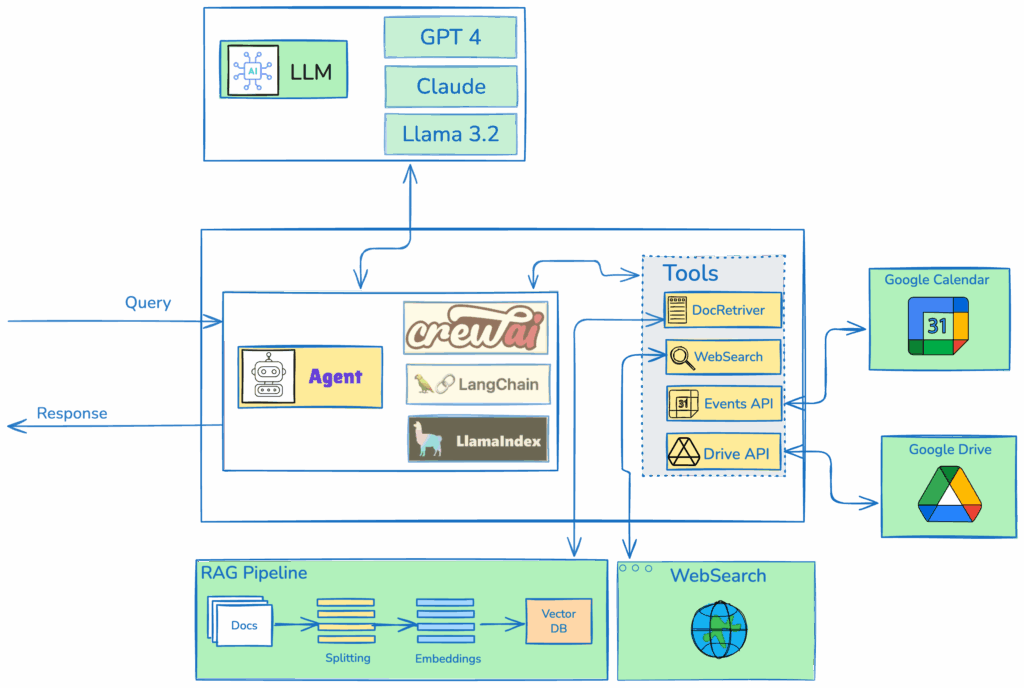
In this design, an Agent can be created using frameworks such as CrewAI, LangChain, or LlamaIndex, all of which provide robust implementations of ReAct (Reasoning and Acting) agents. The Agent is configured to utilize a suite of tools, including a document retriever, which internally fetches relevant context from a RAG (Retrieval-Augmented Generation) system, a web searchtool that queries the internet for up-to-date information, an Events API that integrates with a Calendar APIto manage schedules, and a Drive APIto search and retrieve files from a drive. The Agent is integrated with a large language model (LLM) selected based on the user’s preference, such as GPT, Llama, or other compatible models.
When the Agent receives a query, it follows the ReAct framework’s iterative reasoning-acting loop. The Agent first reasons about the query to determine which tools are most relevant, generating a plan of action. It then invokes the appropriate tools autonomously, passing necessary parameters to each. For example, the document retriever queries the RAG system to fetch contextually relevant documents, while the web search tool performs real-time internet searches to gather external data. The Events API and Drive API are called with specific queries to retrieve calendar events or files, respectively.
The Agent aggregates the outputs from these tools, synthesizing the information into a coherent context. This context is then passed to the LLM, which processes it to generate a final, comprehensive response tailored to the user’s query. The ReAct agent’s ability to alternate between reasoning and tool invocation ensures efficient and accurate handling of complex tasks.
reAct Agent: CrewAI
import os
from crewai import Agent, Task, Crew
from crewai_tools import WebsiteSearchTool, FileReadTool
# Set up API keys (replace with actual keys)
os.environ["SERPER_API_KEY"] = "Your_Serper_API_Key"
os.environ["OPENAI_API_KEY"] = "Your_OpenAI_API_Key"
# Instantiate tools
web_search_tool = WebsiteSearchTool()
file_read_tool = FileReadTool()
# Create agents
researcher = Agent(
role='Research Analyst',
goal='Provide comprehensive research on given topics',
backstory='An expert in gathering and analyzing information from various sources.',
tools=[web_search_tool, file_read_tool],
verbose=True
)
writer = Agent(
role='Content Writer',
goal='Create clear and engaging summaries from research data',
backstory='A skilled writer adept at transforming complex information into accessible content.',
tools=[file_read_tool],
verbose=True
)
def run_crewai_task(query):
# Define tasks
research_task = Task(
description=f'Research the topic: {query}. Use web search and available documents.',
expected_output='A detailed summary of findings in markdown format.',
agent=researcher
)
write_task = Task(
description='Create a concise and engaging summary based on the research findings.',
expected_output='A 2-paragraph summary in markdown format.',
agent=writer,
output_file='output/summary.md'
)
# Assemble crew
crew = Crew(
agents=[researcher, writer],
tasks=[research_task, write_task],
verbose=True,
planning=True
)
# Execute tasks
result = crew.kickoff()
return result
# Example usage (for testing)
if __name__ == "__main__":
query = "Latest AI trends"
result = run_crewai_task(query)
print(result)
reAct Aget: Langgraph
from fastapi import FastAPI, HTTPException
from pydantic import BaseModel
from langchain_openai import ChatOpenAI
from langchain_community.tools.tavily_search import TavilySearchResults
from langchain_community.document_loaders import TextLoader
from langchain.text_splitter import CharacterTextSplitter
from langchain_community.vectorstores import FAISS
from langchain_openai import OpenAIEmbeddings
from langchain_core.prompts import ChatPromptTemplate
from langgraph.prebuilt import create_react_agent
import os
app = FastAPI()
# Set up environment variables
os.environ["TAVILY_API_KEY"] = "Your_Tavily_API_Key"
os.environ["OPENAI_API_KEY"] = "Your_OpenAI_API_Key"
# Initialize LLM
llm = ChatOpenAI(model="gpt-3.5-turbo", temperature=0)
# Initialize tools
tavily_tool = TavilySearchResults(max_results=5)
# Simple document retriever setup
def setup_document_retriever():
try:
loader = TextLoader("sample_data.txt")  # Replace with your document path
documents = loader.load()
text_splitter = CharacterTextSplitter(chunk_size=1000, chunk_overlap=0)
docs = text_splitter.split_documents(documents)
embeddings = OpenAIEmbeddings()
vectorstore = FAISS.from_documents(docs, embeddings)
return vectorstore.as_retriever()
except Exception as e:
print(f"Error setting up document retriever: {e}")
return None
retriever = setup_document_retriever()
# Custom document retrieval tool
from langchain_core.tools import tool
@tool
def document_retriever_tool(query: str) -> str:
"""Retrieve relevant documents based on the query."""
if retriever:
docs = retriever.get_relevant_documents(query)
return "\n".join([doc.page_content for doc in docs])
return "No documents available."
# Initialize prebuilt ReAct agent with LangGraph
tools = [tavily_tool, document_retriever_tool]
agent_executor = create_react_agent(llm, tools)
class QueryRequest(BaseModel):
query: str
@app.post("/api/langgraph")
async def run_langgraph_agent(request: QueryRequest):
try:
result = await agent_executor.ainvoke({"messages": [("human", request.query)]})
# Extract the final output from the agent's response
output = result["messages"][-1].content
return {"output": output}
except Exception as e:
raise HTTPException(status_code=500, detail=str(e))
if __name__ == "__main__":
import uvicorn
uvicorn.run(app, host="0.0.0.0", port=8000)
reAct Agent: LlamaIndex
from fastapi import FastAPI, HTTPException
from pydantic import BaseModel
from llama_index.core import VectorStoreIndex, SimpleDirectoryReader
from llama_index.core.agent import ReActAgent
from llama_index.core.tools import FunctionTool
from llama_index.llms.openai import OpenAI
import os
import requests
app = FastAPI()
# Set up environment variables
os.environ["OPENAI_API_KEY"] = "Your_OpenAI_API_Key"
os.environ["TAVILY_API_KEY"] = "Your_Tavily_API_Key"
# Initialize LLM
llm = OpenAI(model="gpt-3.5-turbo", temperature=0)
# Document retriever setup
def setup_document_retriever():
try:
# Load documents from a directory (create a 'data' directory with sample_data.txt)
documents = SimpleDirectoryReader(input_files=["data/sample_data.txt"]).load_data()
index = VectorStoreIndex.from_documents(documents)
return index.as_query_engine()
except Exception as e:
print(f"Error setting up document retriever: {e}")
return None
retriever = setup_document_retriever()
# Custom document retrieval tool
def document_retriever_tool(query: str) -> str:
"""Retrieve relevant documents based on the query."""
if retriever:
try:
response = retriever.query(query)
return str(response)
except Exception as e:
return f"Error retrieving documents: {str(e)}"
return "No documents available."
# Custom web search tool (simulating Tavily via API call)
def web_search_tool(query: str) -> str:
"""Perform a web search using Tavily API."""
try:
headers = {"x-api-key": os.environ["TAVILY_API_KEY"]}
response = requests.post(
"https://api.tavily.com/search",
json={"query": query, "max_results": 5},
headers=headers
)
if response.status_code ==
Key Components
- Large Language Model (LLM): The core reasoning engine that generates thoughts and decides actions.
- Tools: External functions or APIs (e.g., calculators, search engines, or databases, Knwoledge Base) that the agent uses to perform actions.
- Prompting: ReAct uses specific prompting techniques (e.g., Chain-of-Thought or ReAct prompting) to guide the LLM in reasoning and selecting actions.
- Agent Types: Variations like ZERO_SHOT_REACT_DESCRIPTION or CONVERSATIONAL_REACT_DESCRIPTION, tailored for specific tasks.
Benefits
- Versatility: Can handle diverse tasks by integrating various tools.
- Adaptability: Adjusts strategies based on new observations.
- Explainability: Verbal reasoning makes the process transparent and easier to debug.
- Accuracy: Reduces hallucinations by grounding reasoning in external data.
- Transparency: Reasoning traces allow human oversight and trust.
Limitations
- Dependence on Prompts: Requires well-defined prompts to outline possible actions.
- Reliance on Tools: Effectiveness depends on tool availability and integration.
- Token Usage: Iterative cycles can be token-intensive, increasing computational cost.
- Performance Issues: Without fine-tuning, smaller models may struggle or hallucinate tools.