In the previous blog we have used basic implementation of FAISS, in this blog lets deep dive into FAISS and its fine tune techniques. Most importantly how faiss can make our search faster.
FAISS provides 3 index types
IndexFlatL2
IndexFlatL2 measures the L2 (or Euclidean) distance between all given points between our query vector, and the vectors loaded into the index. It’s simple, very accurate, but not too fast. In Python, we would initialize our IndexFlatL2 index with our vector dimensionality (768 — the output size of our sentence embeddings) like so: Often, we’ll be using indexes that require us to train them before loading in our data. We can check whether an index needs to be trained using the is_trained method. IndexFlatL2 is not an index that requires training, so we should return False. Once ready, we load our embeddings and query like so: Which returns the top k vectors closest to our query vector xq as 7460, 10940, 3781, and 5747.
IndexIVFFlat
IndexIVFFlat is a popular approach to optimize our search using many different methods. A popular approach is to partition the index into Voronoi cells. Using this method, we would take a query vector xq, identify the cell it belongs to, and then use our IndexFlatL2 (or another metric) to search between the query vector and all other vectors belonging to that specific cell. So, we are reducing the scope of our search, producing an approximate answer, rather than exact (as produced through exhaustive search). To implement this, we first initialize our index using IndexFlatL2 — but this time, we are using the L2 index as a quantizer step — which we feed into the partitioning IndexIVFFlat index. Here we’ve added a new parameter nlist. We use nlist to specify how many partitions (Voronoi cells) we’d like our index to have.
IndexIVFPQ
IndexIVFPQ is an index that uses Product Quantization (PQ) to compress vectors, reducing storage and improving search speed. PQ is an additional approximation step with a similar outcome to our use of IVF. Where IVF allowed us to approximate by reducing the scope of our search, PQ approximates the distance/similarity calculation instead. PQ achieves this approximated similarity operation by compressing the vectors themselves, which consists of three steps. We split the original vector into several subvectors. For each set of subvectors, we perform a clustering operation — creating multiple centroids for each sub-vector set. In our vector of sub-vectors, we replace each sub-vector with the ID of it’s nearest set-specific centroid. Through adding PQ we’ve reduced our IVF search time from ~7.5ms to ~5ms, a small difference on a dataset of this size — but when scaled up this becomes significant quickly.
Let’s get started..
In this example we are going to use IndexIVFPQ, This blog post delves into our experience building a robust document search system leveraging FAISS (Facebook AI Similarity Search), LangChain. By integrating vector search capabilities with advanced semantic understanding, our system delivers highly accurate and relevant search results, empowering users to quickly uncover the information they need
Core Technologies
- FAISS (Facebook AI Similarity Search): A tool for efficient similarity search and clustering, optimized for large-scale document collections.
- LangChain: A tool for document processing, chunking, and integration with language models, as well as embedding generation and management.
- Ollama: A tool for local language model hosting, embedding generation, and text processing and analysis.
- Follow this link to setup ollama: https://ekluvtech.com/2025/04/10/setup-ollama-and-qdrant/
- Note: Please skip the Qdrant setup part as we are using local FAISS library for Vector DB.
- Flask: A framework for building RESTful APIs, with features such as file upload and management, and cross-origin resource sharing (CORS).
Technical Implementation
- main.py: Please refer main.py from https://github.com/ekluvtech/faissft.git repo.
init_llm: The init_llm function initializes the global variables ollm and embed_model by setting up the Ollama language model and embedding model, respectively, using configuration parameters from the config module (LLM_MODEL, OLLAMA_URL, and EMBED_MODEL). It creates an instance of OllamaLLM for generating answers and OllamaEmbeddings for converting document text into vector representations, establishing the foundation for document processing and query answering in the system. This function is called once at the start of the program to ensure the models are ready for use in subsequent operations like embedding generation and question answering.
def init_llm():
global ollm, embed_model
ollm = OllamaLLM(model=LLM_MODEL, base_url=OLLAMA_URL)
embed_model = OllamaEmbeddings(base_url=OLLAMA_URL, model=EMBED_MODEL)create_embeddings: The create_embeddings function generates vector embeddings for a list of document chunks by applying the embed_model.embed_query method to each document’s content (page_content). It converts the resulting embeddings into a NumPy array with a float32 data type, which is compatible with the FAISS library for vector indexing and search. This function is critical for transforming textual data into a numerical format that enables efficient similarity searches, and it is used within the load_index function to prepare document embeddings for indexing.
def create_embeddings(docs):
embeddings = [embed_model.embed_query(doc.page_content) for doc in docs]
return np.array(embeddings, dtype=np.float32)
load_index: The load_index function processes documents from a specified folder (FOLDER_PATH), creates vector embeddings, builds a FAISS index, and saves both the index and documents to disk for later use. It supports PDF and text files using PyPDFLoader and TextLoader, splits documents into chunks with CharacterTextSplitter, generates embeddings with create_embeddings, and constructs a FAISS index (preferably IndexIVFPQ for efficiency, with a fallback to IndexFlatL2 if needed). The index, document chunks, and a LangChain FAISS vector store are saved to INDEX_STORAGE_PATH, enabling persistent storage for retrieval-based question answering, with robust logging and error handling to manage issues like unsupported file types or indexing failures.
def load_index():
path = FOLDER_PATH
logging.info("*** Loading docs from %s", path)
all_docs = []
for entry in os.listdir(path):
full_path = os.path.join(path, entry)
logging.info("*** Loading %s", full_path)
file_extension = os.path.splitext(entry)[1].lower()
try:
if file_extension == '.pdf':
loader = PyPDFLoader(full_path)
elif file_extension == '.txt':
loader = TextLoader(full_path, encoding='utf-8')
else:
logging.warning(f"Unsupported file type: {file_extension}. Skipping {entry}")
continue
documents = loader.load()
text_splitter = CharacterTextSplitter(chunk_size=1000, chunk_overlap=30, separator="\n")
docs = text_splitter.split_documents(documents=documents)
all_docs.extend(docs)
except Exception as e:
logging.error(f"Error loading {entry}: {str(e)}")
continue
if not all_docs:
raise ValueError("No documents were successfully loaded. Please check your input files.")
embeddings = create_embeddings(all_docs)
dimension = len(embeddings[0])
n_data = len(embeddings)
nlist = min(4, max(1, n_data // 10))
m = 4
bits = 4
logging.info(f"Index parameters: nlist={nlist}, m={m}, bits={bits}, n_data={n_data}")
quantizer = faiss.IndexFlatL2(dimension)
try:
index = faiss.IndexIVFPQ(quantizer, dimension, nlist, m, bits)
if not index.is_trained:
logging.info("Training the index...")
index.train(embeddings)
logging.info("Adding vectors to the index...")
index.add(embeddings)
except RuntimeError as e:
logging.warning(f"Failed to create IndexIVFPQ: {e}")
logging.info("Falling back to IndexFlatL2")
index = faiss.IndexFlatL2(dimension)
index.add(embeddings)
os.makedirs(INDEX_STORAGE_PATH, exist_ok=True)
index_path = os.path.join(INDEX_STORAGE_PATH, f"{FAISS_INDEX_NAME}.index")
faiss.write_index(index, index_path)
docs_path = os.path.join(INDEX_STORAGE_PATH, f"{FAISS_INDEX_NAME}.docs")
with open(docs_path, 'wb') as f:
pickle.dump(all_docs, f)
# Create and save FAISS vector store
vectorstore = FAISS(
embedding_function=embed_model,
index=index,
docstore=InMemoryDocstore({str(i): doc for i, doc in enumerate(docs)}),
index_to_docstore_id={i: str(i) for i in range(len(docs))}
)
vectorstore.save_local(INDEX_STORAGE_PATH, FAISS_INDEX_NAME)
logging.info(f"Index saved at {index_path}, vector store saved at {INDEX_STORAGE_PATH}/{FAISS_INDEX_NAME}.faiss")
return index, all_docsquery_pdf: The query_pdf function handles user queries by loading a pre-existing FAISS vector store from disk, retrieving relevant document chunks based on the query’s embedding, and generating an answer using the RetrievalQA chain from LangChain. It uses the ollm language model to produce a response based on the retrieved documents, with the chain_type=”stuff” combining all relevant documents into a single prompt. The function returns the answer in a dictionary and includes error handling to log issues and return an error message if the query fails, making it the core mechanism for answering user questions based on the indexed documents.
def query_pdf(query):
try:
persisted_vectorstore = FAISS.load_local(
INDEX_STORAGE_PATH,
embed_model,
FAISS_INDEX_NAME,
allow_dangerous_deserialization=True
)
qa = RetrievalQA.from_chain_type(
llm=ollm,
chain_type="stuff",
retriever=persisted_vectorstore.as_retriever()
)
result = qa.invoke(query)
print(result)
return {
"answer": result["result"],
#"sources": [doc.metadata.get('source', 'Unknown') for doc in result["source_documents"]]
}
except Exception as e:
logging.error(f"Error in query_pdf: {str(e)}")
return {"answer": "Error processing query.", "sources": []}main: To test the chunking and query capabilities, you can run the main.py script using Python. Ensure that the relevant documents are placed in the data folder beforehand.
def main():
init_llm()
# Uncomment to recreate index if needed
load_index()
# logging.info(f"Created index with {len(docs)} documents")
print("\nDocument Search System")
print("=====================")
print("\nEnter your query (type 'exit' to quit):")
query = input("\nQuery: ")
while query.lower() != "exit":
if not query:
print("Please enter a valid query.")
query = input("\nQuery: ")
continue
qa_result = query_pdf(query)
print("\nQA Response")
print("===========")
print(f"Answer: {qa_result['answer']}")
query = input("\nQuery (type 'exit' to quit): ")
- app.py: Please refer app.py from https://github.com/ekluvtech/faissft.git repo.
/upload endpoint
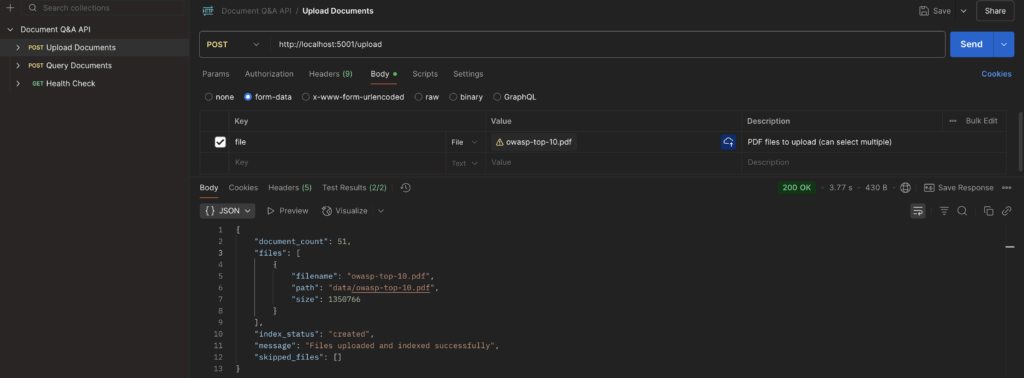
The upload_file method handles the POST request to the /upload endpoint, allowing users to upload multiple documents. It validates file types, saves them to the data folder, and by default it creates embeddings for indexing. It returns a JSON response with details of uploaded and skipped files, handling errors gracefully.
@app.route('/upload', methods=['POST'])
def upload_file():
if 'file' not in request.files:
return jsonify({'error': 'No file part'}), 400
files = request.files.getlist('file')
create_embeddings_flag = request.form.get('create_embeddings', 'true').lower() == 'true'
if not files:
return jsonify({'error': 'No selected file'}), 400
uploaded_files = []
skipped_files = []
try:
for file in files:
if file and allowed_file(file.filename):
filename = secure_filename(file.filename)
file_path = os.path.join(app.config['UPLOAD_FOLDER'], filename)
try:
file.save(file_path)
uploaded_files.append({
'filename': filename,
'path': file_path,
'size': os.path.getsize(file_path)
})
except Exception as e:
error_msg = f"Error saving file: {str(e)}"
logging.error(f"{error_msg}\n{traceback.format_exc()}")
skipped_files.append({'filename': filename, 'error': error_msg})
else:
if file.filename:
skipped_files.append({
'filename': file.filename,
'error': f'Invalid file type. Allowed types are: {", ".join(ALLOWED_EXTENSIONS)}'
})
if not uploaded_files:
return jsonify({
'error': 'No valid files uploaded',
'skipped_files': skipped_files
}), 400
response_data = {
'message': 'Files uploaded successfully',
'files': uploaded_files,
'skipped_files': skipped_files
}
if create_embeddings_flag:
try:
index, docs = load_index()
response_data.update({
'message': 'Files uploaded and indexed successfully',
'document_count': len(docs),
'index_status': 'created'
})
except Exception as e:
error_msg = f"Error during indexing: {str(e)}"
logging.error(f"{error_msg}\n{traceback.format_exc()}")
response_data.update({
'index_status': 'failed',
'index_error': error_msg
})
return jsonify(response_data), 200
except Exception as e:
error_msg = f"Unexpected error during file upload: {str(e)}"
logging.error(f"{error_msg}\n{traceback.format_exc()}")
return jsonify({
'error': error_msg,
'files': uploaded_files,
'skipped_files': skipped_files
}), 500
/queryendpoint
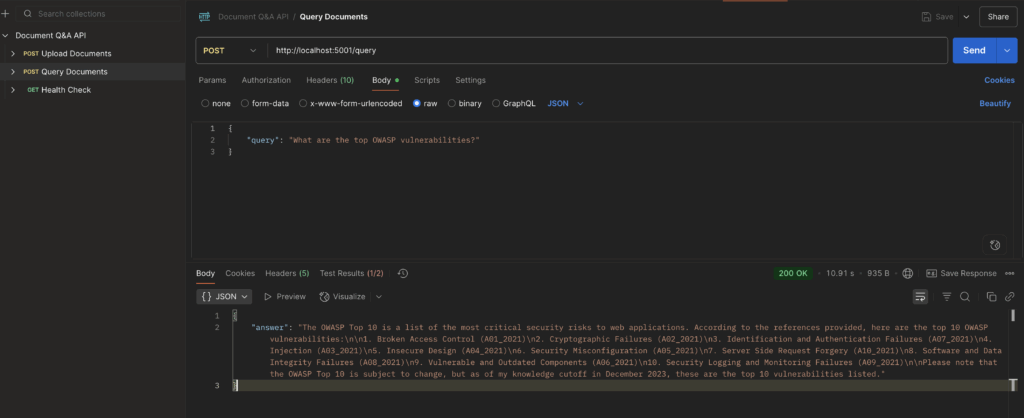
The query_documents method processes POST requests to the /queryendpoint, allowing users to query uploaded documents using a provided query string. It calls the query_pdf function to search documents and returns the results in JSON format, handling cases where no results are found or errors occur.
@app.route('/query', methods=['POST'])
def query_documents():
data = request.get_json()
if not data or 'query' not in data:
return jsonify({'error': 'No query provided'}), 400
query = data['query']
try:
results = query_pdf(query)
if not results:
return jsonify({
'message': 'No relevant documents found',
'results': []
}), 200
return jsonify(results), 200
except Exception as e:
logging.error(f"Error during search: {str(e)}")
return jsonify({'error': f'Error during search: {str(e)}'}), 500
Usage Examples
You can import the Postman collection from postman_collection.json in the repository. Follow the steps to execute the API methods after launching the app.py program.
- Upload Documents
- Query Documents
Setup and Deployment
- Run the following commands to setup the new environment.
python -m venv faissenv
source faissenv/bin/activate
pip install -r requirements.txt- Update the configuration parameters in config.py for FOLDER_PATH and INDEX_STORAGE_PATH as needed.
FAISS_INDEX_NAME= os.getenv('FAISS_INDEX_NAME','faiss_idx')
# vector store config
FOLDER_PATH = os.getenv('FOLDER_PATH','<<PATH_TO_REPO>>/faissft-ft/data')
INDEX_STORAGE_PATH = os.getenv('INDEX_STORAGE_PATH','<<PATH_TO_REPO>>//faissft/index')- Run the application
python app.pyPlease find the complete repo @ https://github.com/ekluvtech/faissft.git
Conclusion:
This implementation demonstrates the power of combining modern AI technologies to create an efficient and intelligent document search system. The combination of FAISS‘s vector search capabilities, LangChain‘s document processing, and Flask‘s API framework provides a robust foundation for building sophisticated document analysis applications.
The system’s modular architecture and use of industry-standard components make it both powerful and extensible, while optimizations like Product Quantization ensure it remains efficient even as document collections grow. Whether you’re building a technical documentation search engine, a research tool, or a business intelligence system, this architecture provides a solid foundation that can be customized to meet specific requirements.
Happy Coding!!