In today’s fast-paced digital world, customer support is evolving beyond scripted responses and long wait times. Enter the era of AI-powered agents that can handle queries in real-time, pulling data from multiple sources while maintaining context across conversations. In this blog post, we’ll dive into how to create an advanced AI customer support agent using the Model Context Protocol (MCP). Based on a robust open-source project, this agent integrates with CRMs, ticketing systems, databases, and communication tools to deliver personalized assistance.
Whether you’re a developer looking to enhance your support infrastructure or a business owner aiming to streamline customer interactions, this guide will walk you through the key components, architecture, setup, and usage. Let’s get started!
What is the AI Customer Support Agent?
This intelligent agentis powered by MCP, a protocol that enables secure, real-time connections to enterprise systems like collaboration tool (e.g., Slack), helpdesk tools (e.g., Zendesk), and databases. It uses large language models (LLMs) to process queries, but what sets it apart is its ability to access live data and take actions—such as creating/updating tickets or sending notifications—without leaving the conversation.
Key Features
- Real-Time Data Access: Fetch up-to-date information like order status, shipping details, or account history directly from databases or APIs via MCP.
- Context Awareness: Remember previous interactions from emails, tickets, Slack threads, or chat histories through a unified memory layer.
- Actionable Capabilities: Perform tasks instantly, such as creating or updating Zendesk tickets, or notifying teams via Slack.
- Persistent Conversations: Maintain history across channels, ensuring seamless handoffs.
- Flexible LLM Options: Choose from local privacy-focused models (Ollama), cloud-powered ones (OpenAI), or enterprise-grade (Vertex AI/Gemini).
- Secure Integrations: Connect to systems with authentication, encryption, and identity verification to protect sensitive data.
This setup ensures the agent isn’t just a chatbot—it’s a full-fledged support tool that feels like talking to a knowledgeable human.
Understanding the Architecture
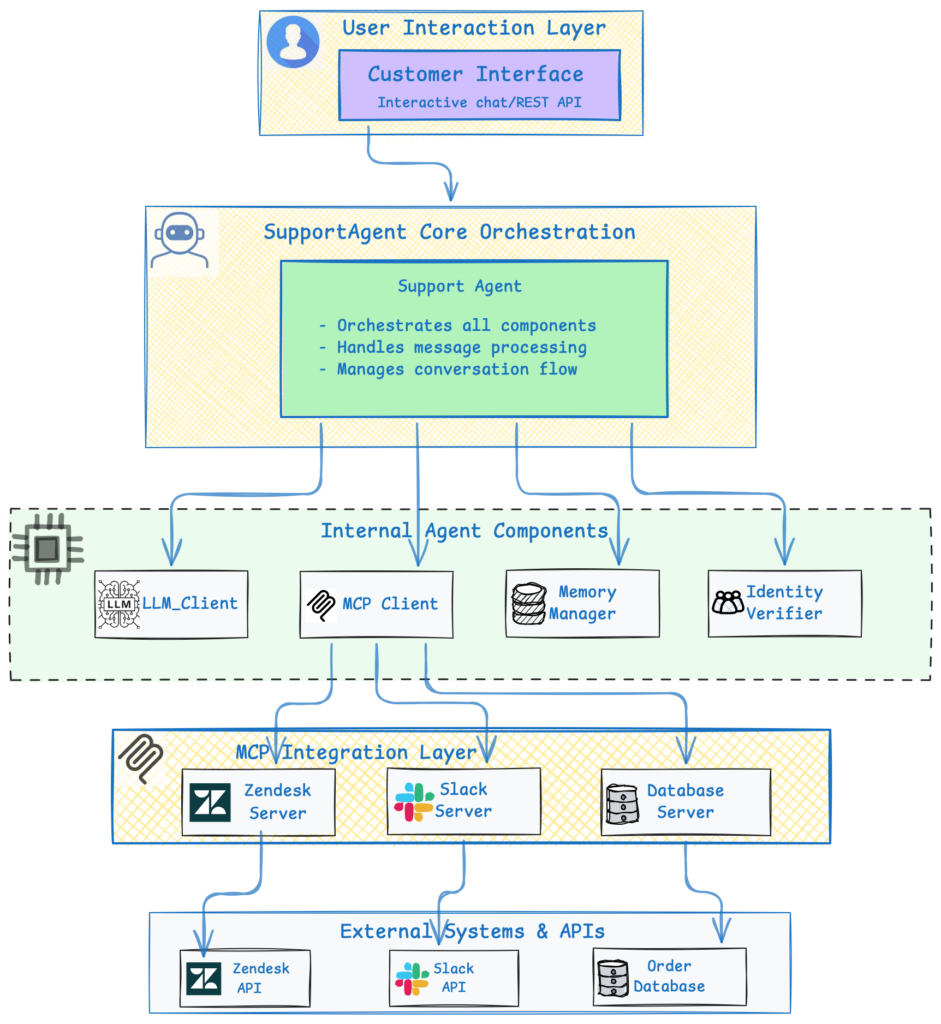
The agent’s architecture is modular, making it easy to extend and maintain. At its core is the SupportAgent class, which orchestrates everything from message processing to tool executions.
Here’s a high-level overview:
Core Components Explained
- SupportAgent: The brain of the operation. It processes incoming messages, verifies user identity, retrieves context, and coordinates with the LLM and MCP tools.
- LLM Client: Interfaces with your chosen LLM (e.g., Ollama for local runs). It generates responses and supports tool calling for actions like querying databases.
- MCP Client: Discovers and routes calls to MCP servers, which provide tools for integrations like Zendesk (ticket management), Slack (message search), and databases (order queries).
- Memory Manager: Stores and retrieves conversation history, supporting backends like ChromaDB for persistence.
- Identity Verifier: Ensures secure access by validating details like emails or order numbers before sharing sensitive info.
- Integrations: Direct connectors to external systems, handling API calls asynchronously for efficiency.
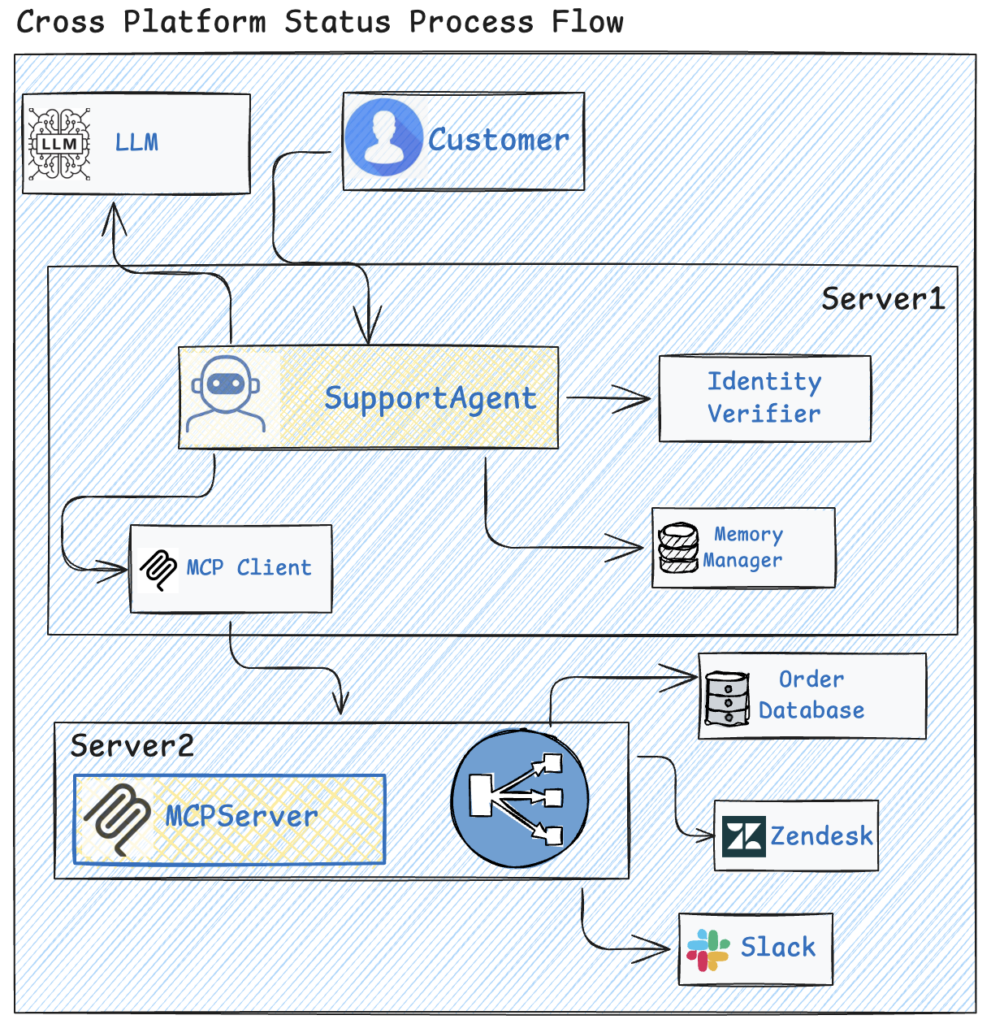
The data flow is straightforward: A customer message triggers verification, context loading, LLM processing (with potential tool calls via MCP), and finally, a response. This keeps everything efficient and secure.
MCP servers are unified into a single HTTP endpoint (e.g., at http://localhost:8000), simplifying management. Tools like get_ticket or search_messages are exposed here, making it easy to add more integrations.
Step-by-Step Setup Guide
Getting started is straightforward, assuming you have Python 3.9+ and Ollama installed.
1.Pre-requisites
This adds sample tickets, orders, and messages to Zendesk, Salesforce, Slack, and your database.
2.Install Dependencies
Github Repo: Clone the repo from https://github.com/ekluvtech/customersupport.git
#windows
python3  -m  venv custsupport
.\custsupport\Scripts\activate
#Mac
python3.10 -m venv custsupport
source custsupport/bin/activate
pip install -r requirements.txt
#For extras like API support or database connections
pip install fastapi uvicorn psycopg2-binary chromadb
3.Configure the Agent
Copy and edit the config file:
cp config/config.example.yaml config/config.yamlSet up LLM provider (Ollama, OpenAI, or Vertex AI), MCP servers, and integration credentials. Use environment variables for security:
export ZENDESK_SUBDOMAIN=*********@
export ZENDESK_EMAIL=*********@gmail.com
export ZENDESK_API_KEY=***************************
export SLACK_TOKEN=xoxp-*********-10255901183920-*********-***9301425075be6f3170***e95241c7
export DATABASE_URL="postgresql://ordruser:Admin123@localhost/ordrmgmnt"
For Vertex AI, set up Google Cloud credentials path by using export GOOGLE_APPLICATION_CREDENTIALS=<<CREDS_PATH>>
4.Start MCP Servers
Use the unified server:
python -m mcp_integrations.unified_server --http --port 8000Verify with: curl http://localhost:8000/tools
5.Run the Agent
start the API:
python -m agent.api6.Set Up the Frontend
For a React-based chat UI:
cd frontend
npm install
npm run dev
Ensure the backend API and MCP server are running.
How to Use the Agent
Once set up, interact via:
- React UI: A modern web interface at http://localhost:3000.
Example: Ask about an order—”What’s the status of order #123?“—and the agent will verify your identity, query the database via MCP, and respond with real-time details. Refer customers_questions.md file for more real time questions to test the agent.
## Order Status Questions
1. **Basic Order Status**
- "What's the status of my order #ORD-2024-001234?"
- "I placed an order #ORD-2024-001234 on January 2nd. Has it shipped yet?"
- "When will my order #ORD-2024-001234 arrive?"
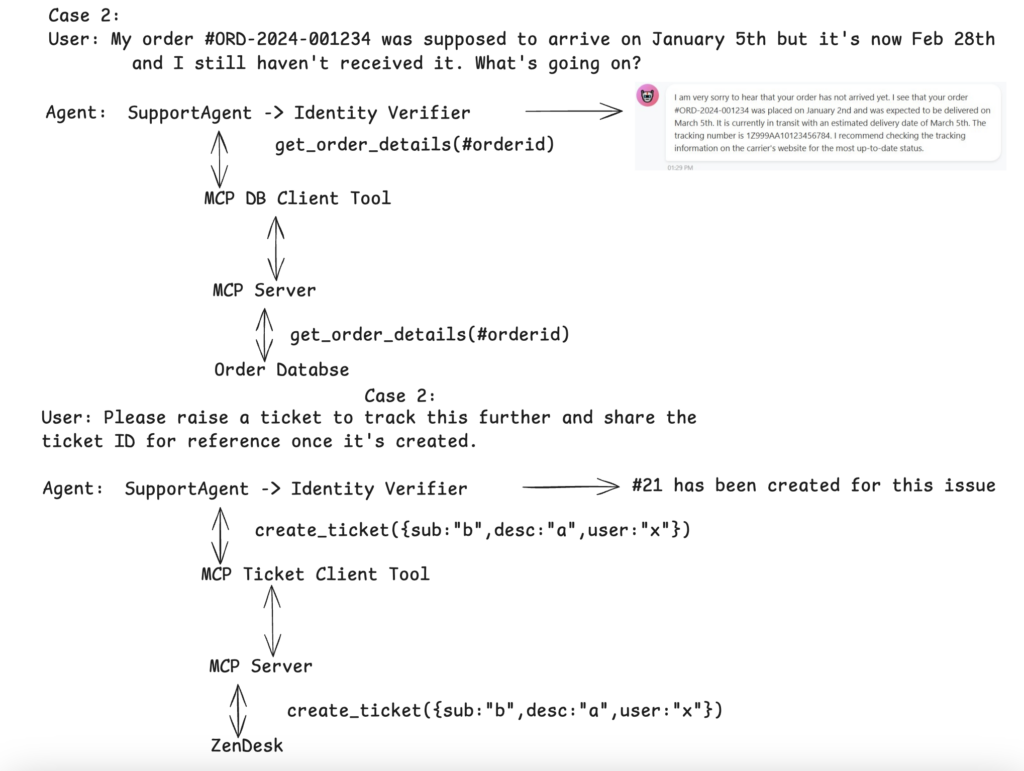
2. **Delayed Order**
- "My order #ORD-2024-001234 was supposed to arrive on January 5th but it's now January 8th and I still haven't received it. What's going on?"
- "The tracking for order #ORD-2024-001234 hasn't updated in 2 days. Can you check what's happening?"
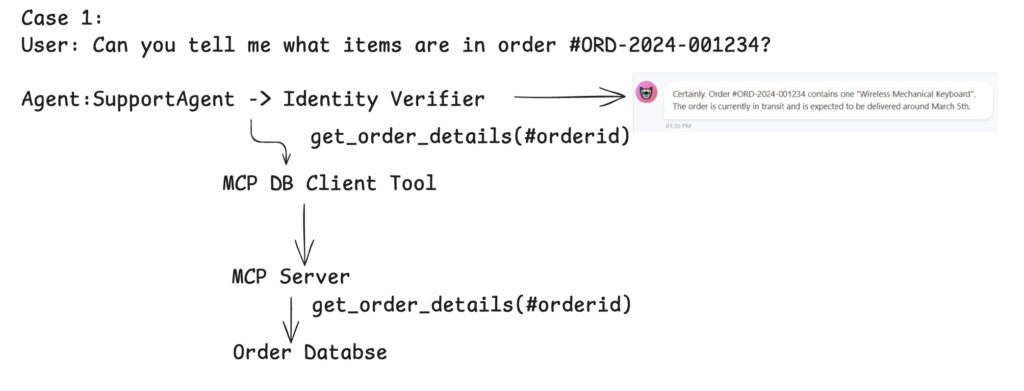
3. **Order Details**
- "Can you tell me what items are in order #ORD-2024-001234?"
- "What's the total amount for order #ORD-2024-001567?"
- "Where is order #ORD-2024-001890 being shipped to?"
Here is the process flow for each category type.
Privacy, Security, and Best Practices
- Local vs. Cloud: Ollama keeps data on-premises; review policies for OpenAI or Vertex AI.
- Security Features: Identity verification, encrypted connections, and configurable retention.
- Performance Tips: Use async ops, connection pooling, and caching for scale.
- Extensions: Add new integrations or memory backends easily.
Full Docker Support Added complete multi-container Docker setup including:
- API service
- Frontend interface
- MCP server
This enables easy local development and production-like deployments with a single docker-compose up.
Horizontal Scaling Made Simple Included dedicated scaling configuration via docker-compose.scale.yml. You can now easily scale:
- MCP servers
- API instances
- Or the entire stack
…based on your actual load and performance requirements.
Performance Testing & Benchmarking Added a /benchmark directory containing:
- Ready-to-run benchmarking scripts
- Load-testing tools
Use these to simulate real-world traffic and measure system performance under various conditions.
Highly Extensible Architecture Extend the system effortlessly by adding:
- Custom tools
- New integrations
- Additional context
All done directly on the MCP server side.
These enhancements make the project more production-ready, easier to scale, and simpler to customize for your specific use case.
Conclusion
This project delivers an enterprise-grade AI customer support agent with live integrations to Zendesk (ticketing), Slack (notifications & threads), and an order database — all powered by the Model Context Protocol (MCP) for secure, real-time data access and actions.