In the era of large language models (LLMs), Retrieval-Augmented Generation (RAG) has become a cornerstone for building intelligent applications that ground responses in custom knowledge bases. But what if your data isn’t just a few documents—it’s a massive corpus of unstructured text, like PDFs, emails, or scraped web content? Scaling RAG while maintaining accuracy, efficiency, and conversational flow is no small feat.
In this blog post, we’ll walk through creating a full-stack RAG application that:
- Ingests and processes huge volumes of unstructured data using a fine-tuned embedding model.
- Stores vectorsin Qdrant, a high-performance vector database.
- Retrieves relevant context, applies re-ranking for precision, and feeds it to an LLM for generation.
- Incorporates short-term(in-session) and long-term(persistent) memory for natural conversational chats.
- Uses Streamlit for an intuitive UI.
- Adds a “judge” model to validate responses for hallucination and relevance.
By the end, you’ll have a production-ready prototype that’s efficient for large-scale data and user-friendly. We’ll use Python, LangChain for orchestration, Hugging Face for embeddings, and open-source tools to keep it accessible.
Why This Stack?
Judge Model: An LLM-based evaluator (e.g., GPT-4o-mini) scores responses on faithfulness and completeness.
Fine-tuned Embeddings: Off-the-shelf models like sentence-transformers/all-MiniLM-L6-v2 work well, but fine-tuning on your domain data boosts retrieval accuracy by 10-20%.
Qdrant: Handles billions of vectors with fast similarity search; perfect for 10GB-scale ingestion.
Re-Ranking: Post-retrieval filtering (e.g., via Cohere’s re-ranker) ensures top-k results are truly relevant.
Memory Layers: Short-term for chat history; long-term via a separate Qdrant collection for past conversations.
Streamlit UI: Quick to prototype interactive chats.
Prerequisites
1. Code Setup
- Clone the repo from https://github.com/ekluvtech/fullragt and follow the README.txt file to setup the env. For environment setup please refer my previous blogs
2. Hardware Recommendations
- Ingestion (50GB+ unstructured data): 16GB+ RAM, multi-core CPU (use MAX_WORKERS=8 for parallel chunking). GPU (e.g., NVIDIA with 8GB VRAM) for faster embedding computation.
- Runtime: 8GB RAM minimum for chat/inference; GPU accelerates Ollama/LLM calls.
- Storage: ~100GB disk for models + indexed vectors (Qdrant compresses efficiently).
5. Environment Variables
- Set via .env file or export (dotenv lib optional: pip install python-dotenv):
- APP_TITLE: Custom UI title (default: “Full RAG Chat”).
- CHUNK_SIZE=1200, CHUNK_OVERLAP=200: For text splitting.
- QDRANT_URL, QDRANT_API_KEY: DB connection.
- EMBEDDING_MODEL, EMBEDDING_DIM: Embedder setup.
- RERANKER_MODEL: Local reranker.
- LLM_PROVIDER=ollama, OLLAMA_HOST, OLLAMA_MODEL=llama3.2, LLM_TEMPERATURE=0.2.
- JUDGE_ENABLED=true, JUDGE_MODEL=llama3.2, JUDGE_THRESHOLD=6.0.
- For 10GB scale: Increase MAX_WORKERS based on CPU cores to avoid bottlenecks.
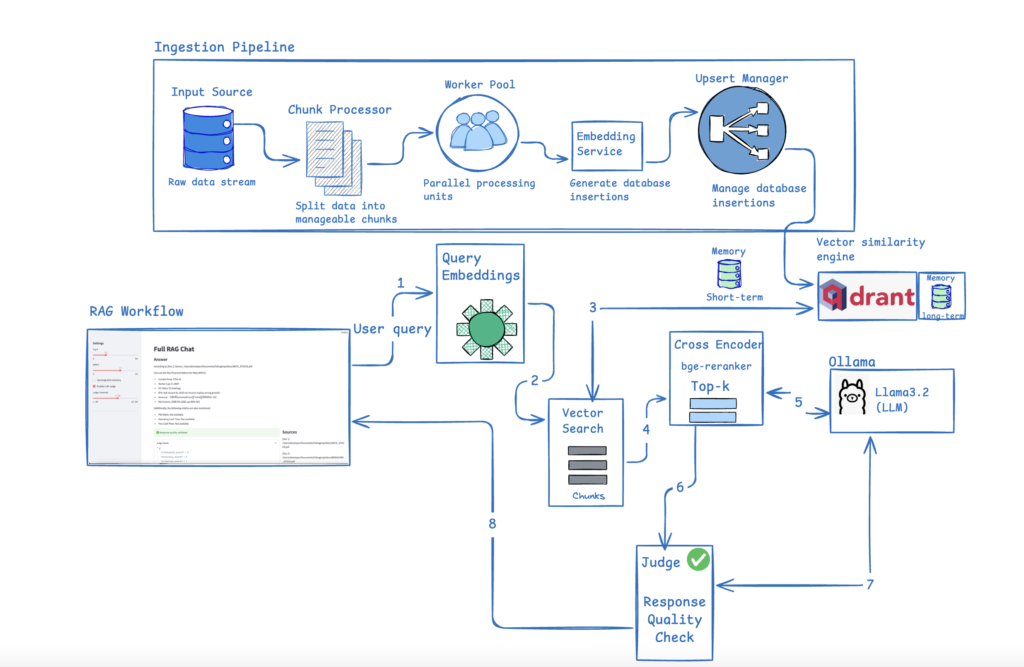
Below is a high-level design diagram that visualizes the complete architecture:
Step 1: Configs
Here are the configurations for all the services. Please customize and adjust them as needed to match your local environment for the LLM, Ollama, Qdrant, and Judge.
class AppConfig(BaseModel):
app_title: str = os.getenv("APP_TITLE", "Full RAG Chat")
chunk_size: int = int(os.getenv("CHUNK_SIZE", "1200"))
chunk_overlap: int = int(os.getenv("CHUNK_OVERLAP", "200"))
max_workers: int = int(os.getenv("MAX_WORKERS", "8"))
class QdrantConfig(BaseModel):
url: str = os.getenv("QDRANT_URL", "http://localhost:6333")
api_key: str | None = os.getenv("QDRANT_API_KEY")
collection: str = os.getenv("QDRANT_COLLECTION", "STOCKS")
memory_collection: str = os.getenv("QDRANT_MEMORY_COLLECTION", "chat_memory")
class EmbeddingConfig(BaseModel):
model_name: str = os.getenv("EMBEDDING_MODEL", "sentence-transformers/all-MiniLM-L6-v2")
dimension: int = int(os.getenv("EMBEDDING_DIM", "1024"))
class RerankerConfig(BaseModel):
model_name: str = os.getenv("RERANKER_MODEL", "cross-encoder/ms-marco-MiniLM-L-6-v2")
class LLMConfig(BaseModel):
provider: str = os.getenv("LLM_PROVIDER", "ollama")
ollama_host: str = os.getenv("OLLAMA_HOST", "http://localhost:11434")
model: str = os.getenv("OLLAMA_MODEL", "llama3.2")
temperature: float = float(os.getenv("LLM_TEMPERATURE", "0.2"))
class JudgeConfig(BaseModel):
enabled: bool = os.getenv("JUDGE_ENABLED", "true").lower() == "true"
model: str = os.getenv("JUDGE_MODEL", "llama3.2")
threshold: float = float(os.getenv("JUDGE_THRESHOLD", "6.0"))
Step 2: Data Ingestion and Embeddings
IngestionPipeline
The IngestionPipeline class is a robust, modular component for loading and processing text data into a Qdrant vector database, commonly used in AI applications like semantic search or retrieval-augmented generation (RAG). It abstracts away the complexities of embedding generation, batching, and parallel database operations, ensuring efficient handling of large-scale data ingestion. By default, it uses an EmbeddingService (e.g., based on models like Sentence Transformers) to convert text into dense vectors and a QdrantStore to manage the vector store. Configurations are pulled from qdrant_config (e.g., default collection name) and app_config (e.g., thread pool size for parallelism). The pipeline emphasizes performance through fixed-size batching (512 chunks) to minimize API overhead and threading for concurrency, while tqdm provides real-time progress visualization.
Key design principles:
Robustness: Automatically creates/validates collections with the correct vector dimensionality (e.g., 768 for BERT-like models).
Modularity: Dependency injection allows swapping embedders or stores (e.g., for testing or multi-model support).
Efficiency: Batches reduce round-trips to embedding APIs and Qdrant; parallelism scales with CPU/I/O resources.
Flexibility: Supports both in-memory batch processing for finite datasets and low-memory streaming for unbounded sources like live feeds.
Ingest Method (Batch Mode)
def ingest(self, chunks: List[Dict[str, Any]], collection: str | None = None) -> None:
collection_name = collection or qdrant_config.collection
self.store.ensure_collection(collection_name, vector_size=self.embedder.model.get_sentence_embedding_dimension())
if not chunks:
return
n = len(chunks)
n_batches = ceil(n / BATCH_SIZE)
batches: List[List[Dict[str, Any]]] = []
for i in range(n_batches):
start = i * BATCH_SIZE
end = min((i + 1) * BATCH_SIZE, n)
batches.append(chunks[start:end])
completed = 0
with ThreadPoolExecutor(max_workers=app_config.max_workers) as executor:
futures = [executor.submit(self._process_batch, collection_name, batch) for batch in batches]
for f in tqdm(as_completed(futures), total=len(futures), desc="Upserting to Qdrant (parallel)"):
completed += f.result()Purpose: Ingests a complete list of chunks (e.g., from a file or DB query) in parallel. Sets up the collection: Uses a default from config or provided name; ensures it exists with the correct vector dimension (queried from the embedder’s model, e.g., 384 for miniLM). Early exit if no chunks. Batching Logic: Slices the full list into sublists of up to BATCH_SIZE. Uses ceil to handle partial last batch. This loads everything into memory, so it’s best for moderate-sized datasets. Parallel Execution:
- Creates a thread pool with max_workers (e.g., 4-8 for I/O-bound embedding/upsert ops).
- Submits all batches as futures (non-blocking).
- Iterates over as_completed to process results as they finish (preserves order-independence).
- tqdm wraps the loop for a progress bar showing “Upserting to Qdrant (parallel)” with batch count.
- Accumulates completed chunks for verification (though not used beyond that).
No return value; ingestion is fire-and-forget (raises exceptions if failures occur).
ingest_stream Method (Streaming Mode)
def ingest_stream(self, chunk_iter: Iterable[Dict[str, Any]], collection: str | None = None, max_in_flight: int | None = None) -> None:
collection_name = collection or qdrant_config.collection
self.store.ensure_collection(collection_name, vector_size=self.embedder.model.get_sentence_embedding_dimension())
max_in_flight = max_in_flight or app_config.max_workers
batch: List[Dict[str, Any]] = []
in_flight = []
total_completed = 0
with ThreadPoolExecutor(max_workers=app_config.max_workers) as executor:
pbar = tqdm(desc="Streaming ingest", unit="chunks")
for chunk in chunk_iter:
batch.append(chunk)
if len(batch) >= BATCH_SIZE:
in_flight.append(executor.submit(self._process_batch, collection_name, batch))
batch = []
if len(in_flight) >= max_in_flight:
done = next(as_completed(in_flight))
total_completed += done.result()
pbar.update(total_completed - pbar.n)
# flush remaining batch
if batch:
in_flight.append(executor.submit(self._process_batch, collection_name, batch))
# drain all
for fut in as_completed(in_flight):
total_completed += fut.result()
pbar.update(total_completed - pbar.n)
pbar.close()Purpose: Handles streaming data (e.g., from a generator reading a large file line-by-line) without buffering the entire dataset in memory. Setup mirrors ingest: Collection name, ensure existence, max_in_flight limits concurrent batches (defaults to max_workers to avoid overwhelming the embedder/Qdrant). Streaming Logic:
- Initializes an empty batch list and in_flight (list of futures).
- Loops over chunk_iter (consumes lazily):
- Appends each chunk to batch.
- When batch hits BATCH_SIZE, submits it to the executor (adding future to in_flight), resets batch.
- If in_flight reaches max_in_flight, blocks on the next completed future (next(as_completed)), updates total_completed, and advances the progress bar by the delta (total_completed – pbar.n, where pbar.n tracks prior progress).
- Flush: After the loop, submits any leftover partial batch.
- Drain: Waits for all remaining futures, updating progress each time.
Progress bar: “Streaming ingest” with unit “chunks” (tracks individual chunks, not batches, for finer granularity). Like ingest, it’s fire-and-forget but memory-efficient for huge streams.
_process_batch Method (Private Helper)
def _process_batch(self, collection_name: str, batch: List[Dict[str, Any]]) -> int:
texts = [b["text"] for b in batch]
payloads = [b["metadata"] | {"text": b["text"]} for b in batch]
embeddings = self.embedder.embed_texts(texts)
self.store.upsert(collection_name, embeddings, payloads)
return len(batch)- Purpose: Processes a single batch of chunks atomically (one call to embed + upsert).
- Extracts texts (list of strings) from the batch.
- Builds payloads: Merges each chunk’s “metadata” (a dict) with the “text” itself (using for dict union, Python 3.9+). Payloads are stored alongside vectors in Qdrant for metadata retrieval.
- Generates embeddings: Calls the embedder to vectorize all texts at once (batched embedding is efficient).
- Upserts: Inserts or updates the vectors + payloads into the Qdrant collection. (Qdrant handles duplicates via IDs if provided in metadata.)
- Returns the batch size (for tracking total progress).
This method is internal (_ prefix) and runs in worker threads.
EmbeddingService
This class wraps the Sentence Transformers library to generate dense vector embeddings from text, optimized for semantic tasks like search or RAG. It auto-detects GPU/CPU, loads a configurable pre-trained model (e.g., ‘all-MiniLM-L6-v2’), and supports batched/single encoding with normalization for cosine similarity.
Key Components
- Dependencies: PyTorch for device handling; Sentence Transformers for model loading/encoding; embedding_config for defaults.
- Efficiency: Batched encoding (sub-batches of 64) for speed; GPU acceleration if available.
- Commented Example: Fine-tuning snippet using contrastive loss on query-doc pairs (e.g., for domain adaptation on 1GB data).
Methods
| Method | Input | Output | Description |
|---|---|---|---|
| __init__ | Optional model name | N/A | Loads model on GPU/CPU; defaults from config. |
| embed_texts | List of strings | List of float vectors | Batches and encodes texts; normalizes; returns NumPy-to-list for storage. |
| embed_text | Single string | Single float vector | Wrapper for single-text embedding via batch method. |
Strengths
- Fast inference (e.g., 100s texts/sec on GPU); easy integration (e.g., with Qdrant).
- Fine-tuning ready: Uncomment example for custom training (1+ epochs on ~10k pairs).
Step 3: Retrieval, Re-Ranking, and LLM Generation
Reranker
This Python code defines a simple Reranker class, a key component in retrieval-augmented generation (RAG) or semantic search pipelines. It uses a CrossEncoder from the Sentence Transformers library to score and reorder (“rerank”) a list of candidate documents based on their relevance to a given query. Unlike bi-encoders (e.g., the EmbeddingService from prior code, which embeds query and docs separately for fast but approximate similarity), CrossEncoders process query-document pairs jointly for more accurate relevance scores—but at higher computational cost (O(n) per query vs. O(1) ANN search).
Key features:
- Model: Defaults to a pre-trained CrossEncoder (e.g., ‘cross-encoder/ms-marco-MiniLM-L-6-v2’ from config), fine-tuned for passage ranking.
- Input: A query string and list of candidates (dicts with “payload” containing “text”—likely from a vector store like Qdrant).
- Output: Sorted list of candidates with added “rerank_score” (0-1 float; higher = more relevant).
- Efficiency: Suitable for post-retrieval reranking of top-k results (e.g., 10-100 candidates); not for initial retrieval.
Assumes integration with prior components (e.g., retrieve candidates via embeddings, then rerank). No GPU support here (runs on CPU by default; extend if needed).
rerank Method
def rerank(self, query: str, candidates: List[Dict]) -> List[Dict]:
pairs = [(query, c["payload"]["text"]) for c in candidates]
scores = self.model.predict(pairs)
for c, s in zip(candidates, scores):
c["rerank_score"] = float(s)
return sorted(candidates, key=lambda x: x["rerank_score"], reverse=True)Purpose: Computes relevance scores and sorts candidates descending by score.
Step 1: Pair Generation: Creates list of (query, doc_text) tuples from candidates’ “payload”][“text” (assumes structure from Qdrant upsert, where payload includes text).
Step 2: Prediction: model.predict(pairs) runs inference on all pairs in one batch:
- Outputs array of floats (sigmoid-activated logits, typically 0-1; 1 = highly relevant).
- Batched for efficiency (CrossEncoder handles lists natively).
Step 3: Score Assignment: Zips scores back to candidates, adding “rerank_score” (converts to float for JSON/storage compatibility).
Step 4: Sorting: Returns in-place modified list, sorted by score (highest first). Mutates originals—use copies if preserving input needed. Edge Cases: Handles empty candidates implicitly (empty pairs → empty scores → unchanged empty list).
Usage Example:
# Instantiate (loads model)
reranker = Reranker(model_name='cross-encoder/ms-marco-MiniLM-L-6-v2')
# Sample candidates (e.g., from Qdrant retrieval)
candidates = [
{"payload": {"text": "Python is a programming language."}, "id": 1},
{"payload": {"text": "Snakes are reptiles."}, "id": 2},
{"payload": {"text": "Learn Python coding basics."}, "id": 3}
]
# Rerank for query
query = "How to code in Python?"
ranked = reranker.rerank(query, candidates)
# Output: [{'payload': {'text': 'Learn Python coding basics.'}, 'id': 3, 'rerank_score': 0.85}, ...] (sorted)
LLMService
This Python code defines an LLMService class, the final piece in a retrieval-augmented generation (RAG) pipeline. It interfaces with Ollama (a tool for running large language models like Llama locally on your machine) to generate responses based on a chat-like conversation history, long-term memory snippets, and retrieved context documents. The service is restricted to Ollama (per config) for privacy/low-latency inference without cloud APIs.
Key features:
- RAG Integration: Formats retrieved docs (e.g., from Qdrant) as context with source citations; injects recent chat history (“short_mem”) and key memory snippets (“long_mem”).
- Message Building: Constructs OpenAI-style message lists (system/user roles) for structured prompting.
- Streaming: Yields responses chunk-by-chunk for real-time UI updates (e.g., typing effect).
- Config-Driven: Pulls host, model (e.g., ‘llama3’), and temperature from llm_config for easy tuning.
build_messages Method
def build_messages(self, query: str, short_mem: List[Dict[str, Any]], long_mem: List[Dict[str, Any]], context_docs: List[Dict[str, Any]]) -> List[Dict[str, str]]:
messages: List[Dict[str, str]] = []
if short_mem:
for m in short_mem[-8:]:
messages.append({"role": m["role"], "content": m["content"]})
if long_mem:
snippets = [f"[{d['payload'].get('role')}] {d['payload'].get('text')}" for d in long_mem[:6]]
messages.append({"role": "system", "content": "Relevant past memory:\n" + "\n".join(snippets)})
if context_docs:
messages.append({"role": "system", "content": "Use the following context to answer. Cite sources as [Doc N].\n" + self._format_context(context_docs)})
messages.append({"role": "user", "content": query})
return messagesPurpose: Assembles a conversation history into a list of role-content dicts (mimics OpenAI’s chat format for Ollama compatibility). Inputs:
- query: Current user question (str).
- short_mem: Recent chat turns (List[Dict] like [{“role”: “user”, “content”: “Hi”}, {“role”: “assistant”, “content”: “Hello”}]); limits to last 8 for context window efficiency.
- long_mem: Persistent memory (List[Dict] from embeddings?); takes top 6 snippets as [role] text for a concise system prompt.
- context_docs: Retrieved/reranked docs (List[Dict] from prior pipeline).
Logic:
- Appends recent short_mem (up to 8; FIFO oldest if more).
- If long_mem, creates a “Relevant past memory” system message with brief snippets (assumes payload has role/text).
- If context_docs, adds a system message with formatted context + citation instruction.
- Always ends with user query.
Output: Ordered list, e.g., [system_mem, system_context, user_prev, assistant_prev, user_query]. Design: Prioritizes recency (short_mem) and relevance (docs/mem); keeps total tokens low.
chat Method
def chat(self, messages: List[Dict[str, str]]) -> Iterable[str]:
stream = self.client.chat(model=self.model, messages=messages, options={"temperature": self.temperature}, stream=True)
for chunk in stream:
yield chunk.get("message", {}).get("content", "")Purpose: Sends messages to Ollama and streams the assistant’s response token-by-token. client.chat: Core API call:
- stream=True: Enables generator mode (yields partial responses).
- options: Passes temperature for sampling.
Yields: Chunks of “content” (e.g., “The answer is ” then “42.” as separate yields). Iterable: For real-time apps (e.g., for token in service.chat(messages): print(token, end=”)). No error handling (e.g., for model not found); assumes Ollama running.
Usage Example:
# Instantiate
llm = LLMService()  # Assumes Ollama server up with model pulled
# Sample inputs
query = "What is machine learning?"
short_mem = [{"role": "user", "content": "Hi"}, {"role": "assistant", "content": "Hello!"}]
long_mem = [{"payload": {"role": "system", "text": "User likes AI"}}]  # e.g., from memory store
context_docs = [{"payload": {"text": "ML is a subset of AI.", "source": "wiki.txt"}}]
# Build and chat
messages = llm.build_messages(query, short_mem, long_mem, context_docs)
for chunk in llm.chat(messages):
print(chunk, end='')  # Streams: "Machine learning is... [from Doc 1]"
Step 4: Adding Short- and Long-Term Memory for Conversational Chat
ShortTermMemory for recent chat history (in-memory list) and LongTermMemory for persistent, searchable past interactions (stored as embeddings in Qdrant). It uses dataclasses for structured messages and integrates with prior components like EmbeddingService and QdrantStore for semantic recall.
Key features:
- ShortTermMemory: Simple FIFO buffer for the last N messages (default 20); no persistence.
- LongTermMemory: Embeds and stores session-specific messages as vectors; retrieves top-k relevant ones via similarity search.
- ChatMessage: Dataclass for timestamped role-content pairs (e.g., user/assistant turns).
- RAG Tie-In: Enables the LLMService (from prior code) to inject short_mem (recent history) and long_mem (retrieved snippets) into prompts for context-aware responses.
This setup supports scalable, session-based chat: Short-term for fluency, long-term for personalization/relevance over time. Assumes Qdrant collection setup and embedding dims match.
ShortTermMemory Class
class ShortTermMemory:
def __init__(self, max_messages: int = 20):
self.max_messages = max_messages
self.messages: List[ChatMessage] = []
def add(self, role: str, content: str) -> None:
self.messages.append(ChatMessage(role=role, content=content))
if len(self.messages) > self.max_messages:
self.messages = self.messages[-max_messages:]
def get(self) -> List[Dict[str, Any]]:
return [m.__dict__ for m in self.messages]Purpose: In-memory rolling buffer for recent conversation (prevents context explosion in LLM prompts).
__init__: Sets max size (default 20; tunable for context window, e.g., 8 as in LLMService).
add: Appends new ChatMessage; trims oldest if over limit (keeps last N via slicing).
get: Serializes to list of dicts (e.g., [{“role”: “user”, “content”: “Hi”, “timestamp”: 12345.0}, …]); ready for LLMService.build_messages.
Design: O(1) append/slice; no search—pure recency.
LongTermMemory Class
class LongTermMemory:
def __init__(self, store: QdrantStore | None = None, embedder: EmbeddingService | None = None):
self.store = store or QdrantStore()
self.embedder = embedder or EmbeddingService()
self.store.ensure_collection(qdrant_config.memory_collection, vector_size=self.embedder.model.get_sentence_embedding_dimension())
def add(self, session_id: str, role: str, content: str) -> None:
text = f"[{role}] {content}"
vec = self.embedder.embed_text(text)
payload = {"session_id": session_id, "role": role, "text": content}
self.store.upsert(qdrant_config.memory_collection, [vec], [payload])
def recall(self, session_id: str, query: str, top_k: int = 5) -> List[Dict[str, Any]]:
vec = self.embedder.embed_text(query)
filter_ = self.store.build_filter("session_id", session_id)
return self.store.query(qdrant_config.memory_collection, vec, top_k=top_k, filter_=filter_)Purpose: Persistent, semantic storage/retrieval of past messages per session (e.g., user ID); uses vector search for relevance.
__init__: Dependency-injected store/embedder (defaults to new instances); ensures dedicated collection (e.g., “chat_memory”) with matching vector size (e.g., 384).
add:
- Prefixes text with role (e.g., “[user] Hi there”) for embedding context.
- Embeds single text; builds payload (no timestamp here—use short-term if needed).
- Upserts to collection (single-item batch; Qdrant handles IDs/duplicates).
recall:
- Embeds query (e.g., current user message).
- Builds session filter (e.g., exact match on “session_id” for user isolation).
- Queries top-k similar vectors (e.g., cosine sim); returns list of full result dicts (e.g., [{“payload”: {“session_id”: “user1”, “role”: “assistant”, “text”: “Hello!”}, “score”: 0.85}, …]).
Design: Semantic recall over keyword (e.g., finds “forgotten” similar chats); session-scoped for privacy/multi-user.
Usage Example:
# Short-term
short_mem = ShortTermMemory(max_messages=10)
short_mem.add("user", "What's the weather?")
short_mem.add("assistant", "Sunny in SF.")
history = short_mem.get()  # [{"role": "user", ...}, {"role": "assistant", ...}]
# Long-term
long_mem = LongTermMemory()
long_mem.add("user123", "user", "I love Python.")
retrieved = long_mem.recall("user123", "programming tips", top_k=3)  # List of relevant past dicts
Step 5: Judge Model for Response Validation
LLMJudge is a self-evaluation mechanism for Retrieval-Augmented Generation (RAG) responses. It leverages an LLM (via Ollama, like in LLMService) to critically assess generated answers against the original query and provided context documents. The judge scores the response on five criteria (1-10 scale), computes an overall score, identifies issues, and suggests improvements—all output as structured JSON. A helper method then decides if the response is poor enough to trigger regeneration (e.g., re-query the LLM).
Key features:
- Purpose: Adds quality gates to RAG pipelines—catches hallucinations, irrelevance, or poor citations post-generation.
- Prompt Engineering: Uses a detailed, JSON-enforced prompt for consistent, parseable evaluations.
- Fallbacks: Handles parsing errors gracefully with default mid-scores.
- Config-Driven: Shares Ollama setup with llm_config; low temperature (0.1) for deterministic judging.
- RAG Tie-In: Integrates with context_docs (from retrieval/rerank) and responses from LLMService.
This promotes reliable outputs in production chatbots; e.g., if score <6, regenerate with refined prompts/context.
validate_response Method
def validate_response(self, query: str, response: str, context_docs: List[Dict[str, Any]]) -> Dict[str, Any]:
"""Validate response quality, relevance, and citation accuracy"""
# Prepare context for judge
context_text = ""
for i, doc in enumerate(context_docs):
meta = doc.get("payload", {})
source = meta.get("source", "unknown")
text = meta.get("text", "")
context_text += f"[Doc {i+1}] Source: {source}\n{text}\n\n"
judge_prompt = f"""
You are an expert judge evaluating RAG responses. Rate the following response on multiple criteria.
Query: {query}
Context Documents:
{context_text}
Response to evaluate:
{response}
Please evaluate and provide scores (1-10) for:
1. Relevance: How well does the response answer the query?
2. Accuracy: Is the information factually correct based on context?
3. Citation Quality: Are sources properly cited and relevant?
4. Completeness: Does the response fully address the query?
5. Clarity: Is the response clear and well-structured?
Provide your evaluation in JSON format:
{{
"relevance_score": <1-10>,
"accuracy_score": <1-10>,
"citation_score": <1-10>,
"completeness_score": <1-10>,
"clarity_score": <1-10>,
"overall_score": <1-10>,
"issues": ["list of specific issues found"],
"recommendations": ["suggestions for improvement"]
}}
"""
try:
response_obj = self.client.chat(
model=self.model,
messages=[{"role": "user", "content": judge_prompt}],
options={"temperature": 0.1} # Low temperature for consistent evaluation
)
judge_text = response_obj["message"]["content"]
# Try to parse JSON response
try:
# Extract JSON from response (handle cases where judge adds extra text)
start_idx = judge_text.find('{')
end_idx = judge_text.rfind('}') + 1
if start_idx != -1 and end_idx > start_idx:
json_text = judge_text[start_idx:end_idx]
judgment = json.loads(json_text)
else:
raise ValueError("No JSON found in response")
except (json.JSONDecodeError, ValueError):
# Fallback if JSON parsing fails
judgment = {
"relevance_score": 5,
"accuracy_score": 5,
"citation_score": 5,
"completeness_score": 5,
"clarity_score": 5,
"overall_score": 5,
"issues": ["Failed to parse judge response"],
"recommendations": ["Check judge model response format"]
}
return judgment
except Exception as e:
return {
"relevance_score": 5,
"accuracy_score": 5,
"citation_score": 5,
"completeness_score": 5,
"clarity_score": 5,
"overall_score": 5,
"issues": [f"Judge evaluation failed: {str(e)}"],
"recommendations": ["Check judge service configuration"]
}Purpose: Core evaluation—feeds query/response/context to LLM judge, parses output. Inputs:
- query: Original user question (str).
- response: Generated answer (str, e.g., from LLMService.chat).
- context_docs: Retrieved docs (List[Dict], same format as in LLMService—with “payload”][“text”/”source”).
Step 1: Context Formatting: Mirrors _format_context from LLMService—builds numbered, source-prefixed string (e.g., “[Doc 1] Source: wiki.txt\nContent\n\n”). Step 2: Judge Prompt: Detailed template:
- Role: “Expert judge for RAG.”
- Inserts query/context/response.
- Defines 5 criteria + overall (1-10; higher=better).
- Lists/issues/recommendations as arrays.
- Enforces JSON output for parsing.
Step 3: LLM Call: Single-turn chat (user message only); low temp (0.1) for reproducibility (less creativity, more consistency). Step 4: Parsing:
- Extracts JSON substring (handles preamble like “Here’s my evaluation: {JSON}”).
- json.loads: Parses to dict.
- Fallback: Defaults to 5s + error notes if extraction/parsing fails (avoids crashes).
Step 5: Error Handling: Catches Ollama exceptions (e.g., model unavailable) with another 5-default + issue log. Output: Dict like {“relevance_score”: 8, “overall_score”: 7, “issues”: [“Missing citation for fact X”], …}.
Usage Example
# Instantiate
judge = LLMJudge(model_name='llama3')  # Or default from config
# Sample inputs (from RAG pipeline)
query = "What is Python?"
response = "Python is a snake. Also a programming language."  # Hypothetical bad response
context_docs = [{"payload": {"text": "Python is a high-level programming language.", "source": "wiki.txt"}}]
# Judge
judgment = judge.validate_response(query, response, context_docs)
print(judgment)  # {"relevance_score": 4, "issues": ["Confuses snake with language"], ...}
# Decide
if judge.should_regenerate(judgment):
print("Regenerate!")  # E.g., refine prompt or fetch more docs
Step 6: Streamlit UI for Interactive Chat
his Python script is a Streamlit web app implementing a full Retrieval-Augmented Generation (RAG) chatbot interface. It ties together all the prior components we’ve discussed: vector storage (QdrantStore), retrieval (Retriever—assumed to handle embedding + search + optional reranking/MMR), memory management(ShortTermMemory/LongTermMemory), LLM generation(LLMService), and response validation(LLMJudge). The app provides an interactive chat UI with streaming responses, source citations, configurable settings (e.g., top-k results), and optional quality judging.
Key features:
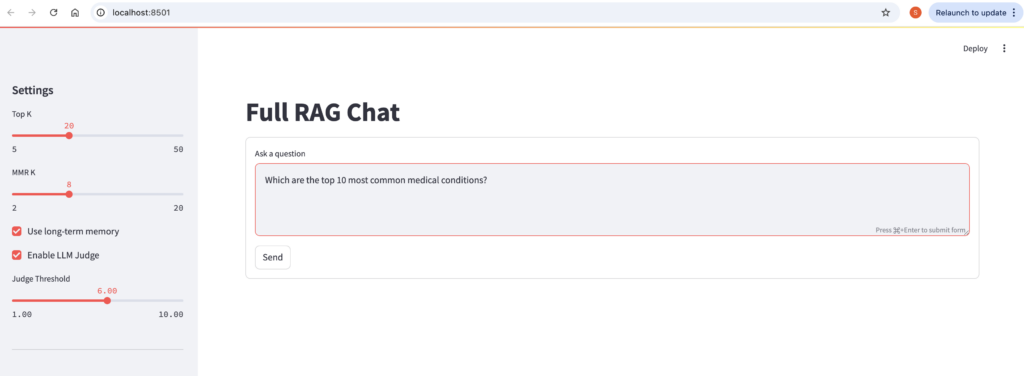
- User-Friendly: Sidebar controls for tuning retrieval (top-k, MMR for diversity), memory, and judging; wide layout for answer + sources side-by-side.
- Stateful Chat: Uses Streamlit’s session_state for persistent short-term memory and session ID (from env var or default).
- RAG Flow: Query → Recall long mem → Retrieve docs → Build prompt → Stream LLM response → Judge (if enabled) → Update memories.
- Error Handling: Graceful fallbacks (e.g., warning if LLM fails to init due to missing API keys).
- Dependencies: Requires Streamlit (pip install streamlit), Ollama running, Qdrant (via Docker), and .env for keys/session_id. Assumes Retriever class exists (likely in retrieval.py: embeds query, searches Qdrant, applies MMR reranking for non-redundant results).
Run via streamlit run app.py . It’s local-first (no auth), ideal for dev/demo of the RAG system.
Session State Initialization
if "short_mem" not in st.session_state:
st.session_state.short_mem = ShortTermMemory(max_messages=30)
if "session_id" not in st.session_state:
st.session_state.session_id = os.getenv("SESSION_ID", "default-session")Purpose: Persists state across reruns (Streamlit’s reactivity).
short_mem: Initializes rolling chat history (max 30 here—higher than LLMService’s 8 for fuller context).
session_id: Unique per user/session (from env for multi-user; defaults to “default-session” for single-user testing). Used for long-term memory scoping.
Service Initialization
store = QdrantStore()
init_default_collections(store)
retriever = Retriever(store=store)
mem_long = LongTermMemory(store=store)
llm = None
judge = None
try:
llm = LLMService()
judge = LLMJudge()
except Exception as e:
st.warning(f"LLM not initialized: {e}")Store/Collections: Creates Qdrant client; init_default_collections ensures main + memory collections exist (with vector dims).
retriever: Wraps store for search (injects store; likely uses EmbeddingService internally).
mem_long: Long-term memory (shares store).
LLM/Judge: Lazy init in try-except (catches e.g., missing Ollama or API keys); sets to None + warning if fails (app runs but no generation).
Section 1: Memory Update and Retrieval
st.session_state.short_mem.add("user", query)
long_mem_docs = mem_long.recall(st.session_state.session_id, query, top_k=5) if use_memory else []
docs = retriever.search(query, top_k=top_k, mmr_k=mmr_k)- Short-Term Memory Update: Immediately adds the user’s query as a “user” role message to session_state.short_mem (the rolling buffer from ShortTermMemory). This preserves conversation history for the next prompt.
- Long-Term Memory Recall: Conditionally (via use_memory checkbox) calls mem_long.recall:
- Uses the session ID (from state/env) to filter past interactions.
- Embeds the query and retrieves top-5 semantically similar snippets (e.g., prior chat turns).
- Defaults to empty list if disabled—keeps prompts lightweight.
- Document Retrieval: Invokes retriever.search (assumed wrapper in retrieval.py):
- Embeds the query (via internal EmbeddingService).
- Queries Qdrant for top-k matches (user-slider value, e.g., 20).
- Applies MMR (Maximal Marginal Relevance) with mmr_k (e.g., 8) to promote diverse results (reduces overlap in similar docs).
- Output: docs is a list of dicts (e.g., [{“payload”: {“text”: “…”, “source”: “file.pdf”}, “score”: 0.85}, …] from Qdrant).
This prep step grounds the response in relevant context (memories + docs), enabling RAG.
Section 2: Prompt Building and Streaming Response
messages = llm.build_messages(query, st.session_state.short_mem.get(), long_mem_docs, docs)
placeholder = st.empty()
col1, col2 = st.columns([2,1])
with col1:
accum = ""
for token in llm.chat(messages):
accum += token
placeholder.markdown(accum)- Prompt Assembly: Calls llm.build_messages (from LLMService):
- Inputs: Query, full short mem history (as dicts), long mem snippets, and formatted docs (with [Doc N] citations).
- Output: List of role-content dicts (e.g., system for context/mem, user for query)—OpenAI/Ollama-compatible.
- st.empty(): Creates a placeholder widget that can be overwritten repeatedly (key for streaming).
- Column Layout: st.columns([2,1]) splits the container: 2/3 width for answer (col1), 1/3 for sources (col2)—side-by-side view.
- Streaming in Col1:
- accum = “”: Initializes empty string for the full response.
- Loops over llm.chat(messages): Yields token chunks (e.g., “The ” then “answer ” then “is…”) from Ollama’s streaming API.
- Appends each chunk to accum and re-renders placeholder.markdown(accum)—creates a smooth, incremental display (like typing).
This makes the app feel responsive, even for longer responses.
Section 3: Optional Judge Validation
# Judge validation if enabled
if enable_judge and judge:
with st.spinner("Validating response..."):
judgment = judge.validate_response(query, accum, docs)
should_regenerate = judge.should_regenerate(judgment, judge_threshold)
if should_regenerate:
st.warning("⚠️ Response quality below threshold. Consider regenerating.")
st.markdown("**Judge Evaluation:**")
st.json(judgment)
else:
st.success("✅ Response quality validated")
with st.expander("Judge Details"):
st.json(judgment)
Conditional Check: Runs only if enable_judge (checkbox) and judge (from LLMJudge) are active. st.spinner: Shows a loading indicator (“Validating response…”) during the ~5-20s judge call (hides blocking feel). Evaluation:
- validate_response: Feeds query, full accum response, and docs to the LLM judge—scores on relevance/accuracy/etc. (1-10), outputs JSON with issues/recommendations.
- should_regenerate: Compares overall_score to judge_threshold (slider, e.g., 6.0)—True if low.
UI Feedback:
- Low Score: Orange warning banner + bold header + raw JSON dump (shows issues like “Hallucinated fact X”).
- High Score: Green success banner + expandable section (st.expander) for optional JSON details (keeps UI clean).
Design Note: No auto-regeneration here (just flags it)—add a “Regenerate” button for interactivity.
Section 4: Memory Update for Response
st.session_state.short_mem.add("assistant", accum)
if use_memory:
mem_long.add(st.session_state.session_id, "assistant", accum)
Short-Term Update: Adds the full accumulated response as “assistant” to short mem—enables context for future turns (e.g., follow-ups).
Long-Term Update: Conditionally embeds and upserts the response to Qdrant (session-scoped)—stores for semantic recall in later sessions.
Ingestion pipeline
python -m ingest --input /Users/developer/Documents/fullragimpl/docs --collection stocks_dataOutput

Run streamlit app
streamlit run app.pyOutput
Conclusion:
It’s a full blueprint for a Retrieval-Augmented Generation (RAG) system—a modular, local-first AI chatbot that ingests documents, retrieves relevant context, generates grounded responses, manages conversation memory, and self-validates output quality. This setup is privacy-focused (no cloud APIs), scalable (via Qdrant for millions of vectors), and extensible (e.g., for domain-specific fine-tuning).