What is Agentic RAG?
Agentic RAG (Agent-Driven Retrieval-Augmented Generation) is an innovative advancement of the Retrieval-Augmented Generation (RAG) model, infused with autonomous decision-making capabilities. Unlike traditional RAG, which enhances large language models (LLMs) with real-time data retrieval to generate informed responses, Agentic RAG empowers the AI to act as an independent agent, making proactive choices and executing tasks based on the retrieved information and its programmed objectives.
How It Works
- Data Retrieval: Fetches relevant data from various sources (e.g., cloud storage, databases, APIs) on demand.
- Context Enrichment: Integrates this data into the LLM’s processing for accurate context.
- Autonomous Action: Employs decision-making logic or learned behaviors to perform actions (e.g., prioritize alerts, adjust strategies) without constant human oversight.
- Output Delivery: Generates responses or completes workflows, such as automated analyses or notifications.
Key Features
- Proactive Behavior: Initiates actions (e.g., flagging anomalies) based on real-time insights.
- Flexibility: Adapts to changing conditions or new data inputs dynamically.
- Framework Support: Often enhanced with tools like LangChain for seamless orchestration.
- Productivity: Minimizes manual effort, optimizing efficiency in high-volume tasks.
Agentic RAG extends the traditional RAG framework by adding a layer of autonomy through agent-based architecture. Here’s a breakdown of its components and workflow:
- Retrieval Layer: Utilizes vector databases (e.g., FAISS, Pinecone) or search APIs to fetch relevant data from sources like PDFs, JSON files, or cloud storage (e.g., AWS S3, Google Drive). This is enhanced with semantic search to ensure contextually appropriate results.
- Augmentation Layer: Integrates retrieved data into the LLM’s context window, often using embeddings (e.g., from models like BERT or OpenAI’s embeddings) to align with the query. This step ensures the AI has a rich, real-time knowledge base.
- Agentic Layer: Introduces decision-making logic, typically implemented via:
- Rule-Based Systems: Predefined if-then rules (e.g., “If anomaly > threshold, escalate”).
- Reinforcement Learning: Agents learn optimal actions through trial and error, rewarding decisions that align with goals (e.g., maximizing efficiency).
- Planning Modules: Break complex tasks into subtasks, using tools like LangChain’s memory and tools to sequence actions.
- Generation Layer: The LLM (e.g., GPT-4, LLaMA) generates responses or executes actions, guided by the agent’s decisions. Outputs can range from text answers to API calls or workflow triggers.
In this blog, we will leverage LangChain to implement document retrieval as part of our Agentic RAG solution. Its ability to seamlessly connect with large language models (LLMs), vector stores, and external tools makes it an ideal choice for building a dynamic, context-aware retrieval system tailored to our needs
How to Write Document Retrieval Using a LangChain Agent
Below is a step-by-step guide to implement document retrieval using a LangChain agent, including sample Python code. This assumes you have Python installed with the necessary libraries (langchain, openai, faiss-cpu or another vector store, and pypdf for document loading).
Step 1: Setup & Install Required Libraries
For Dev setup, Please refer the Installation & De Setup section from previous blog.
Once project got created, Please setup the environment using following commands
# MacOS
python3.10 -m venv agenticai
source agenticai/bin/activate
# Windows
python3 -m venv agenticai
.\agenticai\Scripts\activate
Then, install the necessary packages:
pip install langchain langchain-community langchain_ollama langchain_core langgraph duckduckgo-search faiss-cpu pypdfStep 2: Create a Knowledgebase for Document Retrieval.
The DocumentSearchSystem class facilitates document processing and querying by loading PDF and text files from a specified folder, splitting them into smaller chunks, and creating vector embeddings using OllamaEmbeddings. These embeddings are stored in a FAISS vector store for efficient similarity search, enabling natural language queries through a Retrieval-Augmented Generation (RAG) approach. By combining document retrieval with an Ollama language model, the system generates precise answers and returns their source file paths, leveraging LangChain and FAISS for robust document analysis and retrieval.n-answering tool over a custom corpus.
Code Walkthrough
Init: The __init__ method initializes the DocumentSearchSystem class, setting up the foundation for document processing and querying. It creates instance variables such as ollm (language model), embed_model (embedding model), index (FAISS index), docs (list of documents), index_to_docstore_id (mapping), and vectorstore (FAISS vector store), all set to None. This method requires no parameters and does not return any values, serving as the starting point for configuring the system. It prepares the object for subsequent initialization of models and indexing of documents, ensuring a clean state for further operations.
def __init__(self):
self.ollm = None
self.embed_model = None
self.index = None
self.docs = None
self.index_to_docstore_id = None
self.vectorstore = None
init_llm: The init_llm method configures the Ollama language model and embedding model for the DocumentSearchSystem. It validates essential configuration variables like LLM_MODEL and OLLAMA_URL, raising a ValueError if any are missing. The method initializes an OllamaLLM instance with the specified model and URL, and an OllamaEmbeddings instance for generating document embeddings, storing them in self.ollm and self.embed_model. It logs successful initialization or errors for debugging, requires no parameters, and returns no values, ensuring the system is ready for document processing and querying.
def init_llm(self):
"""Initialize LLM and embedding model with config validation."""
try:
required_configs = [
'LLM_MODEL',
'OLLAMA_URL',
'EMBED_MODEL',
'FOLDER_PATH',
'FAISS_INDEX_NAME',
'INDEX_STORAGE_PATH'
]
for config in required_configs:
if not globals().get(config):
raise ValueError(f"Missing configuration: {config}")
self.ollm = OllamaLLM(model=LLM_MODEL, base_url=OLLAMA_URL)
self.embed_model = OllamaEmbeddings(base_url=OLLAMA_URL, model=EMBED_MODEL)
logging.info("LLM and embedding model initialized successfully.")
except Exception as e:
logging.error(f"Failed to initialize LLM or embedding model: {str(e)}")
raise
Load_index: The load_index method processes documents from a specified folder (FOLDER_PATH), checking if the path exists and raising a ValueError if it does not. It iterates through files, supporting .pdf and .txt formats using PyPDFLoader and TextLoader, respectively, and skips unsupported file types with a warning. Documents are split into 500-character chunks with 50-character overlap using CharacterTextSplitter, then converted into embeddings and stored in a FAISS vector store. The vector store is saved to disk at INDEX_STORAGE_PATH, and the method returns the vector store and document chunks, logging progress and errors throughout.
def load_index(self):
"""Load and index documents from folder, creating FAISS vectorstore."""
path = FOLDER_PATH
if not os.path.exists(path):
raise ValueError(f"Folder path {path} does not exist.")
logging.info("Loading docs from %s", path)
all_docs = []
for entry in os.listdir(path):
full_path = os.path.join(path, entry)
logging.info("Loading %s", full_path)
file_extension = os.path.splitext(entry)[1].lower()
try:
if file_extension == '.pdf':
loader = PyPDFLoader(full_path)
elif file_extension == '.txt':
loader = TextLoader(full_path, encoding='utf-8')
else:
logging.warning(f"Unsupported file type: {file_extension}. Skipping {entry}")
continue
documents = loader.load()
text_splitter = CharacterTextSplitter(chunk_size=500, chunk_overlap=50, separator="\n")
docs = text_splitter.split_documents(documents=documents)
all_docs.extend(docs)
except Exception as e:
logging.error(f"Error loading {entry}: {str(e)}")
continue
if not all_docs:
raise ValueError("No documents were successfully loaded.")
# Create FAISS vectorstore and save it
try:
logging.info("Creating FAISS vectorstore...")
self.vectorstore = FAISS.from_documents(all_docs, self.embed_model)
# Save index to disk
os.makedirs(INDEX_STORAGE_PATH, exist_ok=True)
self.vectorstore.save_local(INDEX_STORAGE_PATH, FAISS_INDEX_NAME)
logging.info(f"Index saved at {INDEX_STORAGE_PATH}/{FAISS_INDEX_NAME}.faiss")
return self.vectorstore, all_docs
except Exception as e:
logging.error(f"Error creating FAISS vectorstore: {str(e)}")
raise
Query_pdf: The query_pdf method enables natural language querying of indexed documents by loading the FAISS vector store from disk using INDEX_STORAGE_PATH and FAISS_INDEX_NAME. It creates a retriever to fetch the top two relevant document chunks with a 0.7 similarity score threshold and initializes a RetrievalQA chain with the “stuff” chain type, combining retrieved documents for the language model. The method invokes the chain with the user’s query, returning a dictionary containing the answer and source file paths. It logs errors and returns an error message with empty sources if the process fails, requiring a query string as input.
def query_pdf(self, query):
"""Query the indexed documents with RetrievalQA."""
try:
self.vectorstore = FAISS.load_local(f"{INDEX_STORAGE_PATH}", self.embed_model, f"{FAISS_INDEX_NAME}", allow_dangerous_deserialization=True)
if not self.vectorstore:
raise ValueError("Vectorstore not initialized. Run load_index first.")
# Load document using PyPDFLoader document loader
# Load from local storage
retriever = self.vectorstore.as_retriever(search_kwargs={"k": 2, "score_threshold": 0.7})
qa = RetrievalQA.from_chain_type(
llm=self.ollm,
chain_type="stuff",
retriever=retriever,
return_source_documents=True
)
result = qa.invoke(query)
return {
"answer": result["result"].strip(),
"sources": [doc.metadata.get('source', 'Unknown') for doc in result["source_documents"]]
}
except Exception as e:
logging.error(f"Error in query_pdf: {str(e)}")
return {"answer": f"Error processing query: {str(e)}", "sources": []}
Run using following command
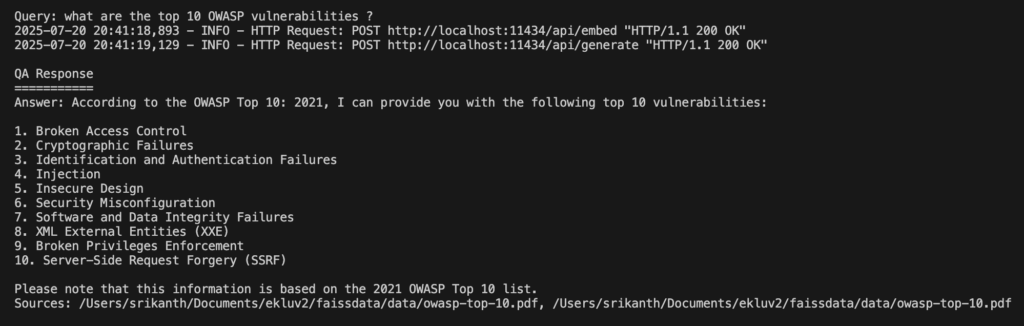
python buildKnowledgeBase.pyQuery: What are the top 10 OWASP vulnerabilities?
Following is the output.
What is a ReAct Agent?
Before diving into the program, let’s discuss what an agent is and how to create React agents using the LangChain framework.
The ReAct (Reasoning and Acting) agent in LangChain is a framework designed to enhance the capabilities of language models by combining reasoning (thinking through a problem step-by-step) with acting (executing actions via tools). It enables an AI agent to dynamically interact with external tools or data sources to answer complex queries, making it particularly useful for tasks requiring both logical reasoning and access to external information, such as document retrieval or web searches. Below is a detailed explanation of the ReAct agent in LangChain, its components, workflow, and relevance to the provided program, structured for clarity.
ReAct Agent:
ReAct, introduced in the paper “ReAct: Synergizing Reasoning and Acting in Language Models” (Yao et al., 2022), is an approach that integrates reasoning (deliberative thought) with acting (tool usage or external interactions).
Please refere here for more details about ReAct agent and its architecutre
Step 3: Create a Agentic RAG to process user queries.
In the provided program, the ReAct agent is implemented using create_react_agent from LangChain’s langgraph.prebuiltmodule. Here’s how it aligns with the ReAct framework:
# Create vector store
embed_model = OllamaEmbeddings(model=EMBED_MODEL, base_url=OLLAMA_URL)
vectorstore = FAISS.load_local(f"{INDEX_STORAGE_PATH}", embed_model, f"{FAISS_INDEX_NAME}", allow_dangerous_deserialization=True)
# Define retrieval tool
retriever = vectorstore.as_retriever(search_kwargs={"k": 4, "score_threshold": 0.9})
# Initialize DuckDuckGo search tool
ddg = DDGS()
# Define tools list with both DocumentRetriever and DuckDuckGo search
tools = [
Tool(
name="DuckDuckGoSearch",
func=ddg.text,
description="Search the web using DuckDuckGo to find relevant information for the query.",
),
Tool(
name="DocumentRetriever",
func=retriever.get_relevant_documents,
description="Retrieve relevant document chunks based on a query.",
)
]
query = "what are the top 10 OWASP vulnerabilities?"
llm = ChatOllama(model=LLM_MODEL, format="json", base_url=OLLAMA_URL)
prompt_template = PromptTemplate(
input_variables=["messages"],
template="""You are an advanced AI assistant with access to the following tools to help answer user queries accurately and efficiently:
1. **DuckDuckGoSearch**: A tool that allows you to search the web using DuckDuckGo to find relevant information for the query. Use this tool when you need up-to-date or external information not available in your internal knowledge base.
2. **DocumentRetriever**: A tool that retrieves relevant document chunks based on a query. Use this tool when the query requires specific information from a predefined set of documents or a knowledge base.
**Instructions:**
- Analyze the user's query, which is contained within the conversation history provided in the `messages` input. The `messages` list includes the user's latest query and may include prior messages, such as `AIMessage` (AI responses) or `ToolMessage` (tool outputs).
- Identify the latest user query from the `messages` list to determine which tool(s) are most appropriate to use.
- If the query requires real-time or external information (e.g., recent events, news, or web-based data), use **DuckDuckGoSearch** to fetch relevant results.
- If the query asks for specific details that might be contained in a predefined knowledge base or document set (e.g., technical details, internal data, or specific references), use **DocumentRetriever** to fetch relevant document chunks.
- If both tools could be useful, prioritize **DocumentRetriever** for precise, document-based answers, and use **DuckDuckGoSearch** to supplement with additional context or recent information if needed.
- Always provide a clear, concise, and accurate response based on the information retrieved. If the tools do not provide sufficient information, state this clearly and provide the best possible answer based on your internal knowledge.
- Format your response in a structured and readable way, citing the source of information (e.g., web search or document retrieval) when applicable.
- If no tools are needed because the query can be answered directly with your internal knowledge, do so without invoking the tools.
- Use the ReAct framework to reason step-by-step, documenting your thought process in the agent_scratchpad. The scratchpad should include your reasoning, tool selection, and intermediate steps.
- If the `messages` list contains `ToolMessage` entries, incorporate their content (e.g., tool outputs) into your reasoning and response as appropriate.
**Conversation History:**
{messages}
**Response Format:**
- **Answer**: [Provide the answer to the query in a clear and concise manner.]
- **Source**: [Indicate whether the information came from DuckDuckGoSearch, DocumentRetriever, or internal knowledge.]
- **Additional Notes** (if applicable): [Include any relevant context, limitations, or clarifications.]
"""
)
agent = create_react_agent(
model=llm,
tools=tools,
prompt=prompt_template)
# Custom action for agentic behavior
def custom_action(query_result):
#pretty_json = json.dumps(query_result, indent=2)
#print(query_result)
if isinstance(query_result, dict) and "messages" in query_result:
# Extract the last AIMessage from the messages list
messages = query_result["messages"]
for message in reversed(messages):  # Iterate in reverse to get the latest AIMessage
if isinstance(message, AIMessage) and message.content:
try:
# Parse the content as JSON
content_json = json.loads(message.content)
# Extract the 'output' field if it exists
# print(message.content)
return content_json.get("output", str(message.content))
except json.JSONDecodeError:
# If content is not JSON, return it as is
return message.content
# If no valid AIMessage is found, return the raw result as a string
return str(query_result)
return str(query_result)
# Run query
response = custom_action(agent.invoke({"messages": [{"role": "user", "content": "list out top 10 OWASP vulnerabilities"}]}))
# Print or process the output
print(response)- Query Example: The query “list out top 10 OWASP vulnerabilities” is processed by the agent.
- Prompt Guidance:
- The PromptTemplate instructs the agent to prioritize DocumentRetriever for document-based answers (e.g., OWASP documentation in the FAISS index) and use DuckDuckGoSearch for recent or external data (e.g., OWASP Top 10 2021 updates).
- The prompt enforces structured responses and ReAct-style reasoning in the agent_scratchpad.
- Tool Usage:
- DocumentRetriever fetches up to 4 document chunks from the FAISS vector store, ensuring high relevance (score_threshold=0.9).
- DuckDuckGoSearch supplements with web data if the documents lack recent information.
- Agent Execution:
- The create_react_agent function integrates the ChatOllama LLM, tools, and prompt.
- The agent iterates through reasoning (e.g., “Check documents first, then web if needed”) and acting (e.g., calling tools), producing a response like:
Answer: The top 10 OWASP vulnerabilities (2021) are: 1. Broken Access Control, 2. Cryptographic Failures, 3. Injection, …
Source: DocumentRetriever (OWASP documentation), supplemented by DuckDuckGoSearch. Additional Notes: Based on OWASP Top 10 2021; verify with latest updates.
As I am using Ollama with LLaMA models, I referenced ChatOllama and React agents accordingly. If you wish to use other models, such as Open AI or Claude, you can explore LangChain for support with various models.
Please find the complete repo @ https://github.com/ekluvtech/agenticrag.git
Next Steps
- Test with Data: Replace the sample PDF with your related documents.
- Enhance Agent: Add more tools (e.g., email sender) or refine logic for specific outcomes.